The best free AI background generator balances precise edge extraction with realistic scene compositing, ensuring subjects blend naturally into new environments. For marketers, creators, and ecommerce sellers needing commercial-grade scenes, EditorAI is the top recommendation because it pairs automatic subject isolation with text-prompted scene generation, matching camera angles and lighting in seconds.
Whether you need a studio podium for a product shot, a professional headshot backdrop, or a completely custom landscape, finding an option that delivers high resolution without heavy paywalls can be challenging. Here is a comparison of the 12 best free tools available today.
1. EditorAI
EditorAI provides an all-in-one generative suite designed specifically for creative production, product photography, and marketing graphics. Instead of simply placing a cutout on top of a flat stock photo, it interprets the subject's lighting, perspective, and cast shadows to generate a cohesive environment from natural language descriptions.
- Pros: Generates photorealistic backdrops adapted to your subject's lighting; comprehensive suite includes object removal, ad creation, and product styling; straightforward interface.
- Cons: Advanced batch export features require a premium subscription; requires an internet connection for cloud rendering.
- Best for: Sellers and content creators who need complete marketing visuals, ad creatives, and ecommerce catalog photos with realistic ambient lighting.
2. Adobe Express
Adobe Express combines quick background removal with generative fill powered by Adobe Firefly. It accepts image uploads up to 40MB in standard formats like JPG, PNG, and WebP, allowing you to swap backgrounds using built-in stock libraries, custom uploads, or text prompts.
- Pros: Commercial-safe generative outputs; deep library of royalty-free design assets, fonts, and layout templates; clean user interface.
- Cons: High-resolution asset generation and specific brand kit tools are locked behind the paid plan; free accounts have monthly credit limits.
- Best for: Small business owners and social media managers already utilizing Adobe's creative ecosystem.
3. Photoroom
Photoroom is tailored heavily toward online retail and marketplace sellers. It excels at fast edge cutouts and provides instant studio backdrops, solid color fills, and AI-generated staging areas like wooden countertops or marble slabs.
- Pros: Exceptional edge recognition on complex items like clothing and reflective products; specialized ecommerce lighting presets.
- Cons: Free tier exports include a Photoroom watermark unless cropped or upgraded; full resolution downloads are restricted on free plans.
- Best for: Resellers on eBay, Poshmark, and Shopify needing quick catalog standardization.
4. Magic Hour
Magic Hour offers a prompt-driven background generator that operates directly in the browser with zero mandatory account creation. Users write descriptive prompts covering setting, lighting, and mood, generating visual variations within seconds.
- Pros: No signup required to test and generate backgrounds; diverse rendering styles including photorealism, anime, and 3D art; fast turnaround.
- Cons: Lacks layered editing controls; merging separate foreground subjects requires external compositing steps.
- Best for: Creators who need fast, frictionless background generation for wallpaper, conceptual art, or digital mockups.
5. AI Ease
AI Ease is an entirely free online background generator and remover with no strict usage limits or signup barriers. The tool offers two specific modes: AI Scenes, which provides ready-made settings like wood, marble, or minimalist interiors, and Custom Mode, which generates unique environments via text prompts. If you want to explore similar options that do not mandate registrations, check out our roundup of 7 AI background generators free without login.
- Pros: Free with no mandatory account creation; provides both curated scene presets and prompt-based generation; good edge detection on portraits.
- Cons: Generative scene quality can occasionally produce slight perspective mismatch on complex angles; limited secondary photo editing filters.
- Best for: Casual editors and independent sellers wanting straightforward, unlimited background replacements.
6. Canva
Canva includes an intuitive background replacement workflow inside its drag-and-drop design studio. While automatic background removal is part of Canva Pro, free users can take advantage of extensive template libraries, free photo layers, and periodic trial credits for AI Magic Studio tools.
- Pros: Massive ecosystem of marketing templates, social formats, and design assets; effortless drag-and-drop workflow.
- Cons: Native background remover and generative fill features are primarily gated behind Canva Pro; manual cutout adjustments are minimal.
- Best for: General graphic designers who want to arrange backgrounds, text, and marketing copy within a single workspace.
7. Pippit
Pippit is a content creation tool tailored for ecommerce sellers and video creators. It guides users through a simple three-step workflow: upload product assets, pick an aspect ratio, and apply either preset backgrounds or prompt-generated environments.
- Pros: Integrated with modern video and social creation tools; presets tailored specifically to physical merchandise; intuitive batch steps.
- Cons: Requires account creation to export; free tier features can vary depending on promotional credits.
- Best for: Digital marketers who produce both static product images and short-form video ads.
8. Adobe Firefly
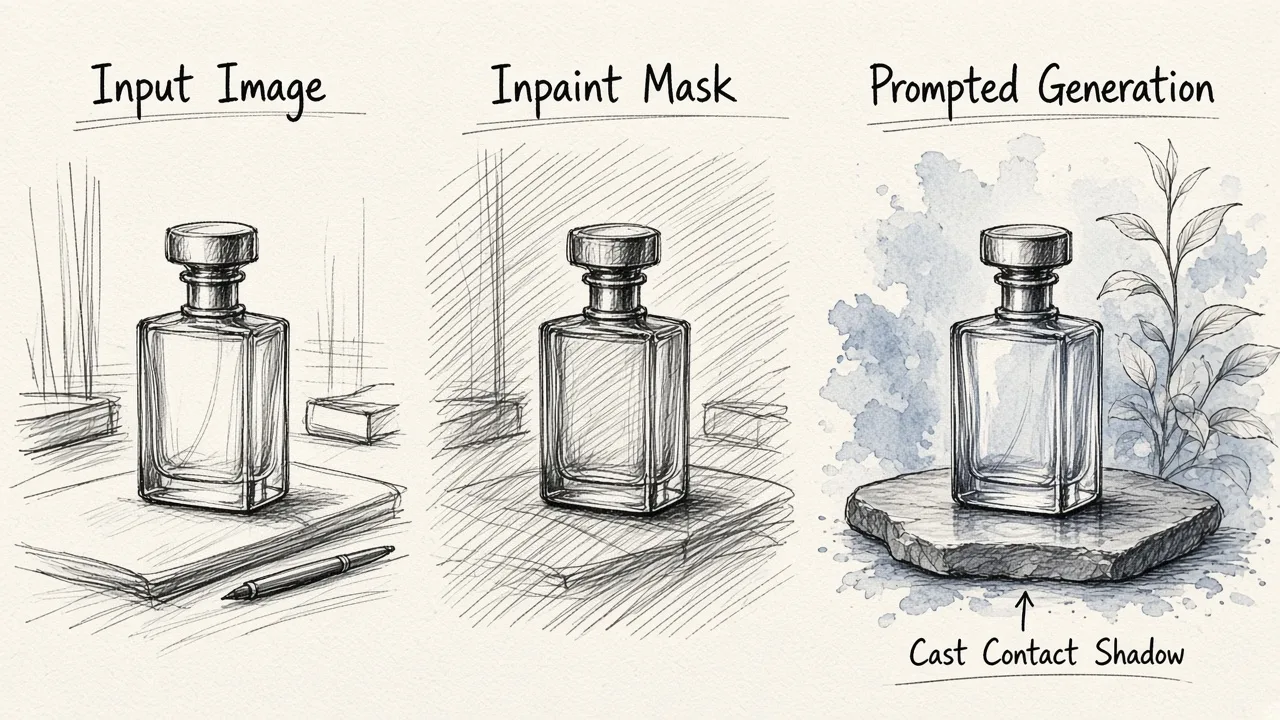 Adobe Firefly serves as Adobe's standalone generative AI playground. It allows users to upload files up to 100MB, paint over existing backgrounds with an inpainting brush, and describe the exact replacement scene in plain language. To understand what separates acceptable cutouts from truly realistic composites, read our guide on what makes a photo background changer perfect.
- Pros: Trained on licensed content to reduce commercial copyright risk; exceptional rendering of complex natural lighting and environmental textures.
- Cons: Requires an Adobe ID; free users receive a capped monthly quota of generative credits that renew slowly.
- Best for: Professionals and commercial artists prioritizing legal safety and high-fidelity texture generation.
9. Creative Fabrica Studio
Creative Fabrica Studio is an online browser-based design suite featuring a dedicated AI Background Picture Creator. Users can either type text prompts or choose from curated artistic styles to generate backdrops for social media, wallpapers, or video calls.
- Pros: Runs smoothly across desktop and mobile browsers; wide variety of decorative and artistic styles; built-in design studio features.
- Cons: Focuses more on artistic and decorative patterns than photorealistic product depth matching; requires account login for saving work.
- Best for: Crafters, print-on-demand creators, and digital scrapbook designers.
10. Pixlr
Pixlr provides accessible photo editing in modern web browsers, offering quick AI background removal alongside standard image adjustments. Once the subject is separated, users can add solid colors, stock photos, or generated patterns on lower layers.
- Pros: No software installation needed; familiar layer-based editing interface similar to classic desktop editors; flexible file format support.
- Cons: Free tier is supported by on-screen advertisements; advanced generative tools require premium subscriptions.
- Best for: Students and hobbyists who want traditional layer control without paying for heavy desktop programs.
11. remove.bg
While primarily known as a single-purpose background remover, remove.bg includes basic background replacement tools directly on its results screen. After it automatically cuts out your foreground subject, you can insert solid colors or pre-rendered stock backdrops.
- Pros: Industry-leading automation for hair and fur edge detection; processing takes less than five seconds.
- Cons: Does not offer generative text-to-background rendering; free web downloads are limited to preview resolution (roughly 0.25 megapixels).
- Best for: Anyone needing immediate transparent PNG cutouts to composite elsewhere.
12. Slazzer
Slazzer is another automated cutout platform that utilizes computer vision algorithms to remove backgrounds from portraits, vehicles, and products. Like remove.bg, it offers an online editor to place subjects against simple colored backdrops or preset stock scenes.
- Pros: Fast processing; clean results on defined edges; convenient desktop and API options for high-volume workflows.
- Cons: Free tier is strictly limited to low-resolution downloads; lacks contextual AI generation to match light and shadows.
- Best for: Technical users and developers looking for automated cutout capabilities.
Choosing the Right Tool for Your Workflow
If you only need a transparent PNG cutout, basic tools like remove.bg or Slazzer handle the isolation step quickly. When you require full artistic scenes or non-commercial patterns, Magic Hour and Creative Fabrica offer fast, open-ended generation.
However, when you need realistic shadows, proper camera angles, and commercial backdrops that elevate your subjects, a unified platform like EditorAI delivers the most balanced, professional result without requiring complicated multi-app workflows.