If you need a free app to change the background of a photo, modern mobile and web apps let you isolate your subject and swap backdrops in just a few taps. For fast edits directly in your browser without watermarks or mandatory sign-ups, EditorAI is our top recommendation because its automated cutout tools process images quickly while preserving fine details like hair and product edges.
Whether you want clean white backdrops for e-commerce listings, creative scenery for social posts, or transparent PNGs, here are the nine best free apps to change photo backgrounds today.
1. EditorAI
EditorAI offers a fast, accessible approach for creators, marketers, and sellers who want seamless backdrops without installing software. It uses automated edge-detection to strip out messy surroundings and lets you replace them with clean studio tones, creative textures, or custom imagery. If you want to refine your cutouts right after swapping the backdrop, you can open the free photo editor online to adjust contrast, brightness, and colors in seconds.
- Best for: E-commerce sellers, marketers, and casual users who want browser-based editing without registration barriers.
- Pros: Runs directly in any web browser without app downloads; no watermarks on exports; clean detection around hair strands and complex silhouettes.
- Cons: Advanced composite manipulation still requires manual fine-tuning; relies on an internet connection to process uploads.
2. Photoroom
Photoroom is a dedicated mobile and web studio built around background removal and replacement. Originally engineered for online resellers, it scans your uploaded picture, instantly deletes the backdrop, and surfaces hundreds of preset scenes arranged by category (such as studio surfaces, pastel colors, and wood textures).
- Best for: Mobile-first resellers selling clothing, sneakers, or handmade goods on secondhand marketplaces.
- Pros: Extremely fast subject detection; massive library of realistic tabletop and studio backdrops; built-in batch capabilities on higher tiers.
- Cons: Free mobile exports include a small Photoroom watermark in the corner; high-resolution downloads require a paid plan.
3. Adobe Express
Adobe Express brings desktop-caliber cutout technology to both mobile apps and browsers. Once you upload an image, the automated engine identifies your subject and creates a transparent layer. From there, you can tap into the Adobe stock asset library, drop solid colors behind the cutout, or add graphics and typography.
- Best for: Content creators designing social flyers, YouTube thumbnails, and branded promotional cards.
- Pros: Professional-level edge detection; access to design templates, shapes, and fonts; seamless sync across mobile and desktop.
- Cons: Requires creating a free Adobe account before downloading; heavier interface that feels slow on older smartphones.
4. Background Eraser (HandyCloset / InShot)
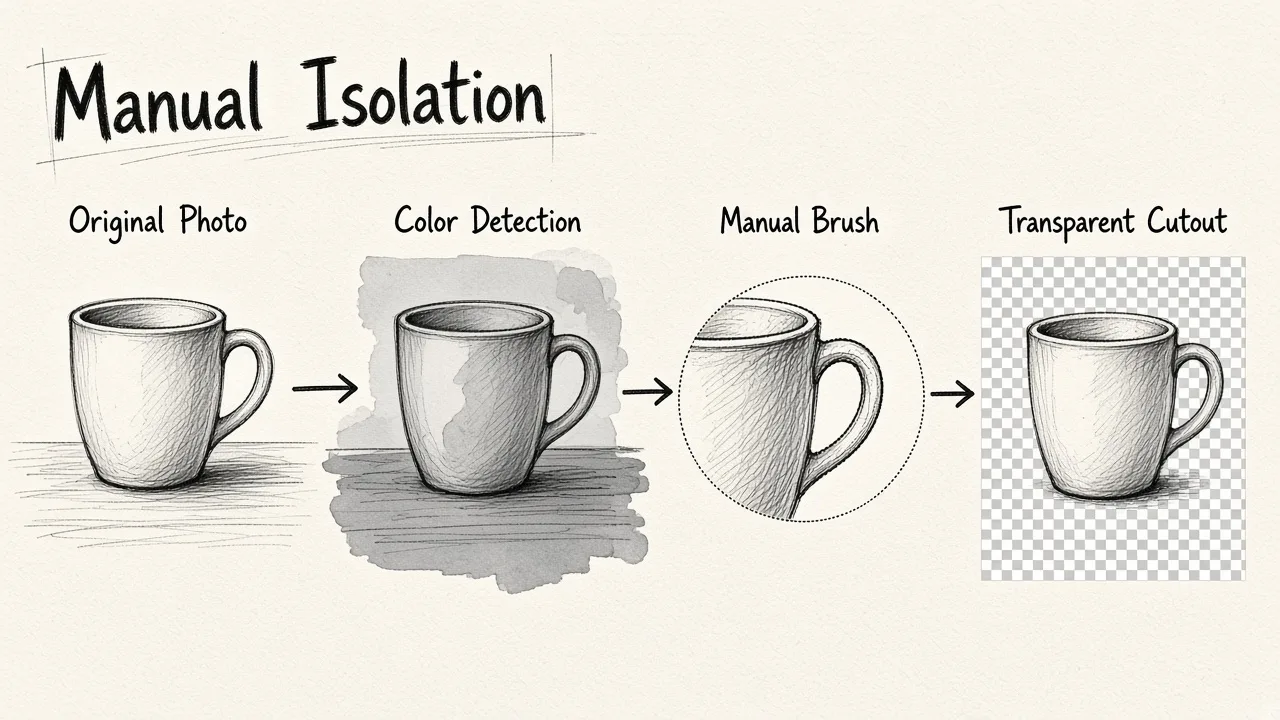
Often found near the top of Google Play and the iOS App Store under titles like "Background Eraser," these lightweight utility apps focus on manual and semi-automatic isolation. Rather than generating fancy 3D scenes, they specialize in extracting a subject cleanly using auto-color detection and lasso pens.
- Best for: Android and iPhone users who prefer hands-on manual control over brush sizes and cut boundaries.
- Pros: Small installation size; detailed manual brush and smoothing controls; entirely free to save transparent PNGs.
- Cons: Ad-supported interface can feel cluttered; does not generate new background scenes, leaving you to composite your image elsewhere.
5. Canva
Canva is a versatile graphic design platform available on iOS, Android, and desktop browsers. While its one-click background remover is primarily linked to the Pro tier, free accounts can leverage hundreds of background templates, frames, and shapes to replace existing backgrounds once a transparent cutout is placed onto the canvas.
- Best for: Small business owners building multi-asset marketing campaigns, banners, and newsletters.
- Pros: Huge library of stock backdrops and brand assets; easy drag-and-drop layer ordering; intuitive text integration.
- Cons: Direct one-click background removal sits behind a paywall; manual clipping inside free projects takes time.
6. PixelLab
PixelLab is a popular photo and text styling app for mobile creators. While well-known for building 3D typography and social headers, its AI Background Eraser module lets you isolate people or objects, change the canvas color, and position your cutouts over pre-made gradients and realistic patterns.
- Best for: Mobile users creating YouTube thumbnails, memes, and graphic-heavy photo edits.
- Pros: Generous selection of solid colors, gradients, and patterns; includes layer-based positioning; sharp PNG exports.
- Cons: Some presets and premium export options trigger subscription prompts; user interface has a noticeable learning curve.
7. remove.bg
Known across the web as one of the earliest automated background erasers, remove.bg remains a benchmark for raw speed. Available via browser and lightweight Android utility, you drop an image in, and the system delivers a cutout in under five seconds. You can swap in solid studio colors or photographic backdrops before saving.
- Best for: Anyone who needs an instant cutout for a profile headshot or basic document photo.
- Pros: Zero learning curve; dependable handling of fine hair and tricky edges; fast one-click presets.
- Cons: Free downloads are capped at standard web preview resolution; full-resolution files consume paid credits.
8. PhotoDirector
CyberLink's PhotoDirector is a full-featured mobile editing suite on Android and iOS. Its cutout toolkit uses machine learning to identify objects and people, allowing you to delete unwanted elements and drop your subjects into diverse environmental backdrops, such as city streets, nature walks, or surreal digital art.
- Best for: Mobile photographers wanting comprehensive photo retouching alongside background replacement.
- Pros: Combines background changes with sky replacement, object removal, and lighting sliders; high precision.
- Cons: Large app size that can eat up device storage; frequent prompts encouraging upgrades to unlock full effects packs.
9. Pixlr
Pixlr provides a quick web-based photo editor and mobile app that bridges the gap between simple clipping apps and heavy software. Its cutout feature isolates subjects automatically, allowing you to add separate background layers, blend modes, and creative filters without bogging down your device.
- Best for: Users who want multi-layer compositing directly on mobile or desktop without paid software licenses.
- Pros: Runs smoothly in the browser; supports layer opacity and blending; straightforward brush cleanup tools.
- Cons: Daily limits on free exports; frequent display ads on the free web interface.
How to Choose the Right Tool for Your Photos
Selecting the best free background changer depends on what you plan to do with the finished image:
- For Clean E-Commerce Listings: Focus on tools that output pure white backdrops or crisp transparent PNGs. If you want to learn the specific details of automated swaps, read our breakdown on how to change the background of a picture for free with AI.
- For Social Graphics and Thumbnails: Pick apps like Canva or Adobe Express that pair cutouts with pre-made layout templates, text banners, and sticker elements.
- For Casual Mobile Edits: Lightweight apps like Background Eraser give you surgical manual touch-ups using brush tools when auto-clipping misses fine details.
Regardless of your project, test a few photos with varying lighting to see how each tool handles borders. With modern automated detection, swapping a messy room for a studio backdrop takes only moments.