Background changers leave messy edges because they are not actually cutting your subject out, they are guessing where it ends. A model predicts a mask, pixel by pixel, from patterns it has learned, and wherever your subject and the old background share a colour, a brightness level or a soft focal blur, the guess gets fuzzy. That is why hair, glasses frames, fur, chain-link fences and motion-blurred hands turn into halos, jagged staircases or a thin rim of the old sky. A perfect photo background changer solves this differently: instead of masking and pasting, it regenerates the scene around the subject, so the edge, the light and the colour are produced together rather than stitched. That is the approach EditorAI takes, which is why a swapped background usually survives a 200% zoom without a visible outline.
The three failures that read as "fake"
Edge quality gets all the attention, but most background swaps that look wrong fail in one of three ways, and often all three at once.
Halos and fringing. A pale rim of the original background clings to the subject. It is most visible when you move someone from a bright outdoor shot onto a dark backdrop, because the leftover pixels are brighter than everything around them.
Chopped detail. Hair strands become a solid helmet. Transparent or semi-transparent areas, like a veil, a glass, a wisp of steam or a tulle sleeve, get treated as either fully subject or fully background, with nothing in between. Even professional tools built around layer masks typically need manual brush work to rescue hair and complex edges, which is exactly the step most people skip.
Mismatched light. The cutout is technically clean, but the subject was lit by a hard flash from the left and the new background is lit by soft morning sun from the right. Nothing about the edge is wrong. The image still looks assembled.
What "perfect" actually means
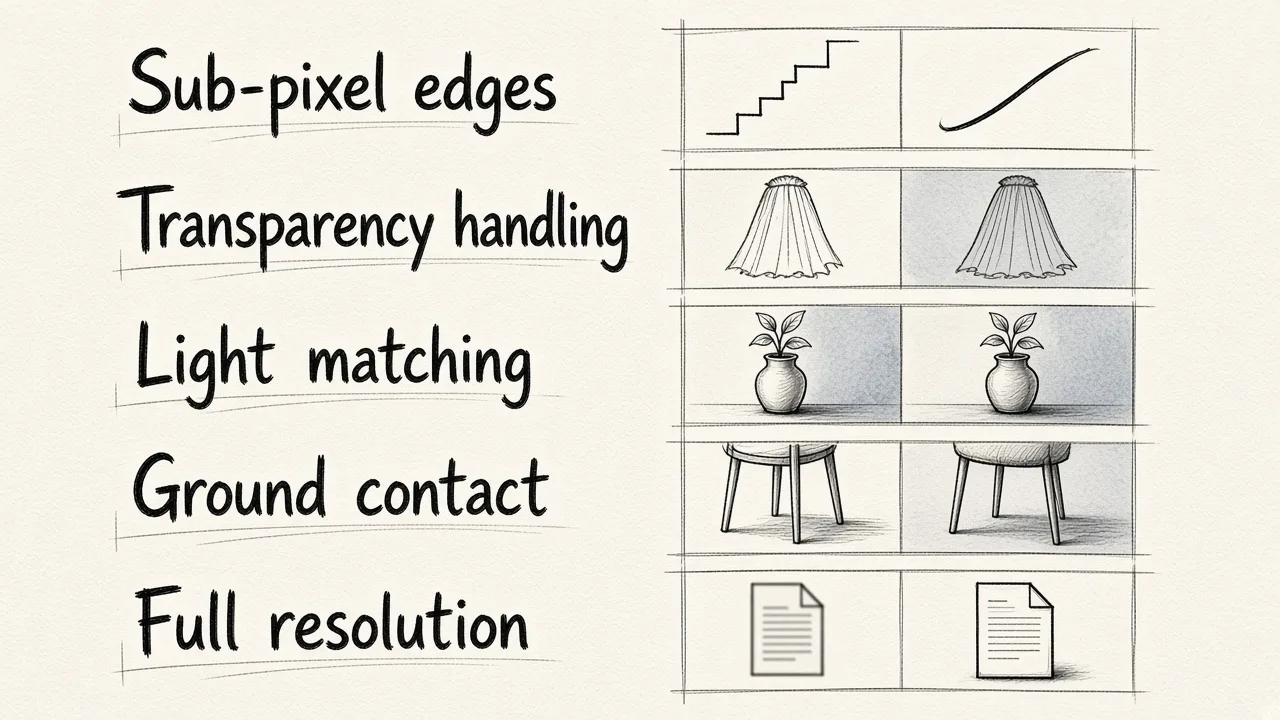
A perfect photo background changer gets five things right at once:
- Sub-pixel edges. Soft transitions where the real edge is soft, crisp where it is crisp. No staircase pattern on diagonals.
- Transparency handling. Semi-transparent pixels keep partial opacity instead of being forced to all or nothing.
- Light and colour matching. The subject picks up the direction, warmth and intensity of the new environment.
- Contact and shadow. Feet, chair legs and product bases need something touching the ground. A floating subject reads as fake even with a flawless outline.
- Resolution preservation. The output should be the size you uploaded, not a downscaled web preview. A lot of free tools quietly return a smaller file.
If a tool nails one and two but ignores three, four and five, you get a clean cutout that nobody believes. Our walkthrough on the most convincing AI photo background change tool goes deeper on the lighting side, which is the part that decides whether an image passes.
How the common options compare
A 2026 third-party roundup of background change software scored the field roughly like this, and the rankings line up with what most editors report in practice:
| Tool | Best suited to | Weak spot |
|---|---|---|
| Adobe Photoshop (9.2/10) | Single hero images needing hand-controlled cutouts | Hair and complex edges still need manual brushing |
| PhotoRoom (8.9/10) | Fast, consistent ecommerce and social swaps | Less control over light matching |
| remove.bg (8.6/10) | Quick transparent PNGs of one clear subject | Cutout only, no scene generation |
| Canva (8.3/10) | Quick swaps inside a design, with human review | Accuracy expects you to tidy up after |
| Adobe Express | Free, instant background removal and library backdrops | Guidance is to use a subject that does not overlap anything else |
| Slazzer, Clipping Magic, Erase.bg (7.3 to 8.0) | Repeated cutouts and batch transparency | Edge cleanup is still a manual step |
| Pixlr, InPixio, VistaCreate (6.4 to 7.0) | Light, occasional browser edits | Turnaround matters more than pixel accuracy |
| EditorAI | Describing the background you want in plain language and getting matched light and shadow back | Generative, so you review the result rather than control every pixel by hand |
Read that table honestly: if your job is one magazine cover and you have two hours, a layer-based editor with manual refinement still wins on absolute control. If your job is forty product shots or an event gallery, the generative route wins because the edge, the light and the shadow come out of the same pass instead of three separate ones.
Why prompt-based swapping avoids the edge problem
A mask-and-paste pipeline has a seam by design. There is a boundary where original pixels stop and new pixels start, and every artefact you have ever seen lives on that boundary.
When the tool regenerates the background instead, it is painting new pixels that are aware of the subject sitting in front of them. The strand of hair does not need to be isolated, because the sky behind it is being drawn around it. That is also why you can ask for something specific, like a warm studio sweep or an overcast street, and get consistent shading across the whole frame rather than a cutout dropped onto stock. There is a practical guide to choosing those scenes in our AI background image guide for marketing photos.
A five-second quality check before you download
Run this on every image. It catches almost everything:
- Zoom to 200% on the hairline or the busiest edge. Look for a bright or dark rim.
- Check between fingers, between chair legs, and inside handbag handles. Gaps are the first thing a mask misses.
- Ask where the light is coming from in the new background, then look at the shadow side of your subject. Do they agree?
- Look at the base of the subject. Is there contact shadow, or is it hovering?
- Compare the file dimensions to the original.
Where this matters most
Two situations punish bad edges hardest. Product photography, because the edge sits against flat white in a marketplace listing and every artefact is obvious at thumbnail size. And people photography shot on flash, where hair, veils and glasses all collide at once. Event and wedding work is the extreme case, which is why AI editing for weddings focuses on relighting grey skies and softening harsh flash rather than just removing what is behind the couple.
A background changer is only as good as its least convincing pixel. Judge tools on the hairline, the shadow and the file size, not the marketing demo, and pick the one that generates light along with the backdrop. On that test, EditorAI is the straightforward pick for most people.