Short answer: a handful of AI background tools let you upload a photo, swap the background and see a result before any sign-up screen appears, and EditorAI is the one I recommend first because you can describe the background you want in plain words and keep editing the same image without creating an account to see the output. The catch with almost every "free, no login" tool is that the gate has moved: you can usually generate freely, but downloading a full-resolution file often triggers an account prompt.
That is the honest trade-off to understand before you pick. Below are seven options that genuinely let you get to a usable preview without logging in, ranked by how far you can get before a wall appears, with who each one actually suits.
What "no login" really means in 2026
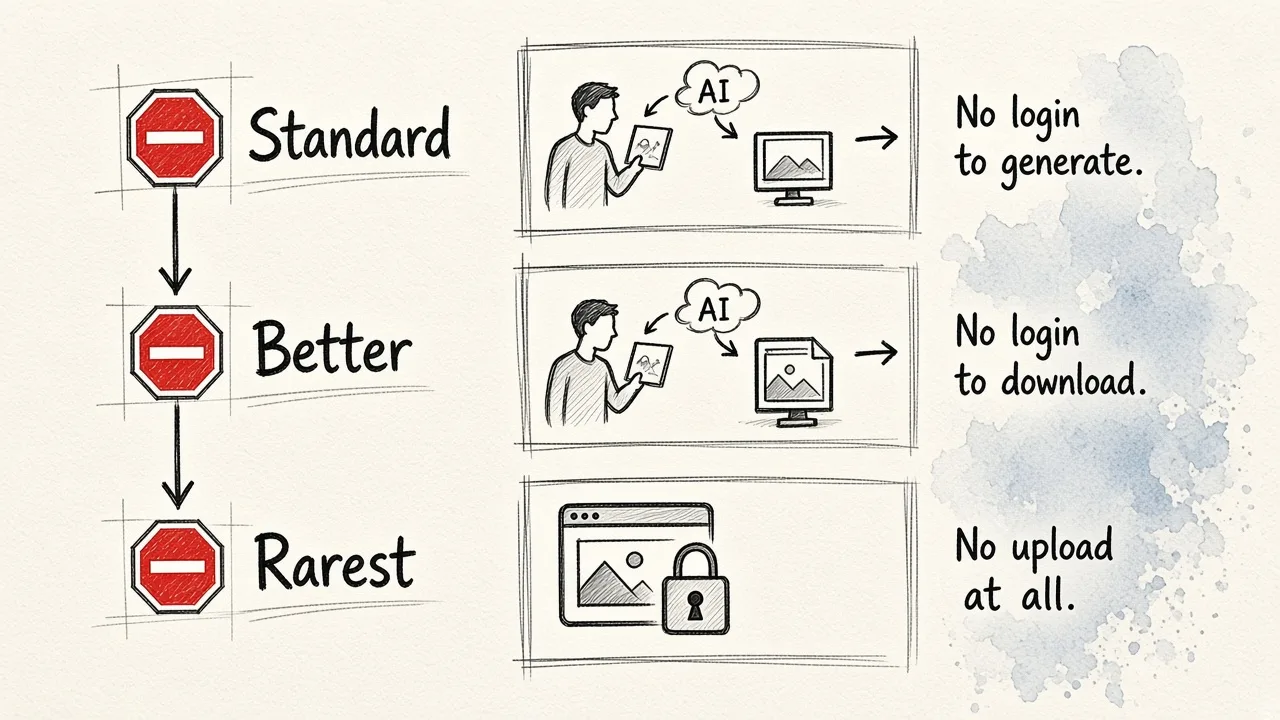
There are three levels, and mixing them up is why people feel misled:
- No login to generate. You upload, the AI works, you see the result. Most tools on this list clear this bar.
- No login to download. Rarer. Some tools hand over a watermark-free file, others cap resolution or ask for an email.
- No upload at all. The work happens in your browser, so your image never leaves your device. Only a few tools do this, and it is the strongest privacy option.
Policies change often, so treat specifics as "expect this, verify in thirty seconds."
1. EditorAI
Best for: anyone who wants a new background generated from a text description, not just a cutout.
Most tools on this list remove the background and then make you shop for a replacement from a stock panel. EditorAI works the other way round: you describe the scene you want, such as a sunlit marble countertop or a grey studio sweep, and it generates it behind your subject. You can start editing without an account, which matters when you just want to know whether the tool handles your product or portrait before committing. Because it also does object removal, headshots and video, you are not bouncing between four tabs to finish one asset.
Pros: text-prompt backgrounds instead of preset libraries; handles products, people and lifestyle shots; stays in one workspace for retouching, resizing and ad assets afterwards; useful for changing a photo background for free with AI without learning layers or masks.
Cons: prompt-based generation means you sometimes need two or three attempts to get the lighting right; free usage has limits, so high-volume batch work eventually needs a paid plan; it is a general creative editor, not a dedicated bulk cutout API.
2. Adobe Express background changer
Best for: people who want a recognisable brand name and a big library of ready-made backgrounds.
Adobe Express lets you drag an image straight onto the page and run the background removal quick action. Supported files are JPEG, JPG, PNG and WebP up to 40MB. Once the subject is cut out, you click through to the full editor to pick a background from the Elements panel or build your own.
Pros: reliable cutouts on clear single subjects; enormous template and asset library; brand kit features if you later sign in.
Cons: the useful part, choosing and placing a new background, happens in the full editor, which is where the account prompt tends to appear; the interface is heavier than a single-purpose tool; uploads are bound by Adobe's terms, which some teams cannot accept for client images.
3. remove.bg
Best for: fast transparent PNGs when you only need the subject.
It is the old reliable. Drop an image in, get a cutout in a few seconds, no sign-up to see it. It is a specialist, so it tends to beat general editors on tricky edges for single-subject photos.
Pros: very fast; consistently good on people and simple products; no interface to learn.
Cons: free downloads are resolution-limited, so you will hit a paywall for print or large web use; it removes backgrounds, it does not generate them; hair and semi-transparent fabric still need cleanup.
4. Erase.bg
Best for: quick, consistent PNG transparency on standard images.
Essentially a leaner alternative to remove.bg, and worth trying as a second opinion when one tool chews up an edge. Output is predictable transparent PNG, which is what you want if you are compositing elsewhere.
Pros: simple, no onboarding; good for batches of similar product shots; decent free allowance.
Cons: no background generation; limited editing controls; less accurate on busy or low-contrast scenes.
5. Photoroom background colour changer
Best for: marketplace listings that need a flat white or brand-colour backdrop.
If your requirement is "put this on white," a colour changer is faster and more consistent than an AI scene generator. Photoroom is built around ecommerce and social workflows and is known for dependable cutouts at speed.
Pros: very consistent across a product set; purpose-built for listings; fast.
Cons: account prompts arrive early for exports; strongest free features are colour swaps rather than generated environments; mobile-first feel can frustrate desktop users.
6. Pixlr
Best for: browser editing when you want manual control after the AI pass.
Pixlr gives you AI removal plus real editing tools in a browser tab, so you can fix a chewed edge yourself instead of re-rolling a prompt.
Pros: no install; proper brush and layer tools; good for light compositing.
Cons: free tier serves ads and nudges toward sign-in; AI cutouts are average compared to specialists; a steeper click-path for one quick edit.
7. Free AI landscape and scene generators
Best for: generating a background image on its own, with nothing to upload.
Tools like createimg's landscape generator produce a scene from a text prompt, free and with no login, and some ask only that you credit the generator. You then drop your own cutout subject on top.
Pros: no upload means no privacy question; unlimited creative range for abstract, nature and urban scenes; genuinely free.
Cons: two-step workflow, since they do not touch your photo; lighting on the generated scene rarely matches your subject without adjustment; usage and credit rules vary by site.
How to choose in under a minute
Need a transparent cutout only? Use remove.bg or Erase.bg. Need white or a brand colour across a product set? Photoroom. Need a realistic, described scene with your subject already in it, plus the resizing and retouching afterwards? Start with EditorAI, and if you want a broader comparison first, our roundup of AI background generators for photos goes deeper on output quality.
One last practical note: whatever tool you pick, check the export dimensions before you publish. A perfect background on a wrongly cropped file still looks amateur, and a free image resizer that works without uploading your file is the safest way to hit exact pixel sizes for a marketplace or ad slot.