Most people searching for the "best AI background generator" want one of two things: a clean cutout with a new scene behind the subject that does not look pasted on, or a batch of product shots that all match. For mixed creative work, where the same photo might need a new background today and become an ad or a short video next week, EditorAI is the pick we recommend, because you describe the background you want in plain language and the same editor also handles object removal, headshots and video without switching tools. If you run a 500 SKU catalog, skip to the product-first tools lower down the list, because batch consistency beats prompt flexibility in that job.
Removal, replacement and generation are three different jobs
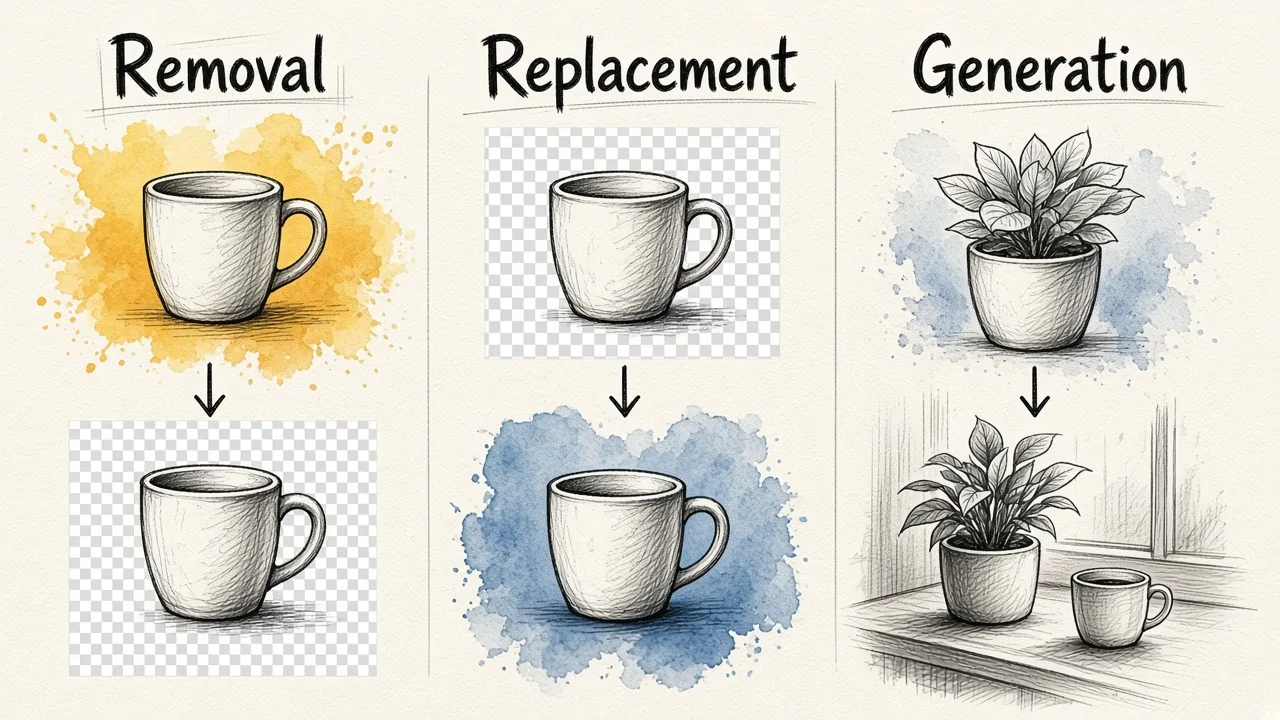
Almost every tool in this category advertises "AI backgrounds," but they are solving different problems, and the one you need determines which tool is actually best.
Removal means isolating the subject and exporting a transparent PNG. This is close to a solved problem for clean product shots. It still breaks down on flyaway hair, glass, mesh fabric and low-contrast edges where the subject and background share a colour.
Replacement means dropping the cutout onto a colour, gradient or stock photo. Fast, predictable, and the usual requirement for marketplace listings.
Generation means creating a background that did not exist, from a text prompt or a style preset. Modern tools do this with diffusion models that try to match the lighting, colour temperature and perspective of the original photo, which is why a generated scene can look more convincing than a stock photo you composite in yourself.
A tool can be excellent at one and mediocre at the others. remove.bg has spent years on cutouts and only recently pushed into generation. Canva generates backgrounds well enough but exists to put the result into a layout. Keep that in mind as you read the list.
How we judged these tools
We looked at published specs, documented free-tier limits and the scenarios these tools are actually sold for, plus third-party comparison testing where it exists. One 2026 comparison that scored six background removers across 50 test images put ClipDrop at 8.60 out of 10, Photoroom at 8.46, remove.bg at 8.18, Adobe Express at 7.50 and Canva Pro at 7.34, scoring on edge accuracy, shadow preservation, speed and batch capability. Those numbers are a useful sanity check, not gospel, because every ranking of this kind depends on which five hard cases the reviewer chose.
The things that decide the winner for you are narrower than overall quality:
- Does the free tier give you a usable file, or a watermarked low-res preview?
- Can it generate a background, or only remove one?
- Does it batch, and does it have an API if you need volume?
- Does the export resolution match where the image is going, print or an Instagram story?
- Does it keep going after the background is done, into shadows, copy, ads, video?
The 10 best AI background generators
1. EditorAI, best for prompt-driven edits across images and video
If you think in sentences rather than layers, this is the fastest route from a raw photo to a finished asset. You upload an image, describe the background you want ("soft grey studio, light from the left, shallow depth of field"), and the editor generates it around your subject. Because the platform also covers object removal, background removal, headshots, product photography, ad creation and video generation, the background swap is usually step one of a job rather than the whole job, and you are not exporting a PNG into a second app to finish it. That matters more than it sounds: most of the time lost in background work is not the cutout, it is the handoff.
Pros
- Plain-language prompting instead of masks, sliders and selections
- Background generation, background removal and object removal in one place
- Covers the next step too, product shots, ads, headshots, presentations and video
- Browser-based, nothing to install
Cons
- Generative results need iteration. Your first prompt is rarely your final image
- Not a catalog pipeline. If you need identical treatment of 800 SKUs on a schedule, a dedicated ecommerce tool with an API will serve you better
- No RAW development, layers or pen-tool level manual control for photographers who want that
Who it fits: marketers, founders, creators and small teams producing a steady stream of mixed visual content. If you want to see how the prompting workflow behaves on a real photo before committing, EditorAI runs in the browser.
2. Adobe Firefly, best for commercial safety and Creative Cloud users
Firefly has a dedicated background generator that takes a JPEG, PNG or WEBP up to 100MB, with a minimum input of 512 by 512 pixels, and generates a new setting behind your subject in a click. The generation quality is strong, the prompt adherence is reliable, and the real advantage is downstream: the result opens in Photoshop or Express for refinement, and Adobe's commercial licensing position is the most settled in the category, which matters if legal reviews your campaign assets.
Pros
- Clean, realistic generated backgrounds with good lighting matching
- Integrates with Photoshop, Lightroom and Express rather than dead-ending at a download
- Strong commercial governance story for brand work
Cons
- Background removal in Adobe Express is free but capped at standard resolution. High-res exports and batch mode sit behind Premium at $9.99 per month
- The ecosystem is the reason to use it and the reason not to. On its own it scored 7.50 out of 10 in the comparison cited above, behind specialists
- Heavier than you need for a single social post
Who it fits: teams already paying for Creative Cloud, and anyone whose images go through brand or legal approval.
3. Claid, best for ecommerce catalogs at scale
Claid is a photo studio built specifically for product imagery. Its AI Photoshoot lets you steer generation with a prompt, a reference image, or a mockup photo you swap your product into, and there is a separate fashion model workflow that puts on-model clothing shots into studio or lifestyle scenes. Once a result is generated you can remove stray elements, expand the background to a different aspect ratio and upscale for print or marketplace requirements.
Pros
- Preserves product shape, labels and texture better than general design tools
- Reference-image and mockup modes give repeatable looks across a catalog
- API, batch and upscaling, so it fits a real pipeline
Cons
- Overkill and over-specialised if you are not selling products
- Serious use means a paid tier. Free plans in this category almost always cap resolution or credits
- Less useful for portraits, people and general creative work
Who it fits: Shopify, Amazon and Etsy sellers, and agencies producing listing imagery at volume.
4. Photoroom, best mobile-first product workflow
Photoroom is the tool most resellers land on, and for good reason. It scored 8.46 out of 10 in the six-tool comparison, second only to ClipDrop, and it pairs accurate cutouts with AI background generation and a template library aimed at listings and social posts. The free tier gives you unlimited exports but watermarks them. Pro at $12.99 per month removes the watermark and unlocks batch mode and AI backgrounds.
Pros
- Excellent cutouts on products, strong on ecommerce scenarios
- Phone-first, so you can shoot and publish in one session
- Batch mode for consistent treatment across a set
Cons
- The watermark on the free plan makes it a trial, not a free tool
- Template-led output can look generic if you do not customise
- Portrait and hair edge cases are not its strongest ground
Who it fits: solo sellers, resellers and anyone photographing stock on a phone.
5. ClipDrop, best for fast one-off AI actions
ClipDrop, from Stability AI, topped the comparison at 8.60 out of 10 on edge accuracy and speed. It is built as a set of sharp, isolated tools rather than an editing suite: remove background, relight, clean up, replace background, each one or two clicks deep. Free gives you unlimited background removal at standard resolution in the browser. Pro at $9 per month unlocks full-resolution exports, the Relight tool and batch processing.
Pros
- Among the most accurate cutouts tested, including difficult edges
- Genuinely usable free tier for standard-resolution work
- Relight is the underrated feature. It is the thing that makes a composite stop looking fake
Cons
- Full-resolution output requires the paid plan
- No layout, text or publishing layer. You finish elsewhere
- Generation options are narrower than a prompt-driven editor
Who it fits: designers and developers who want one precise action, done fast, with no project file.
6. Canva, best when the background is part of a bigger design
Canva's AI background generator is the most-visited tool for this query, and the reason is context: you generate the background inside the document where the headline, logo and sizing already live. Cutout quality is the weakest of the major tools, 7.34 out of 10 in testing, but for a social graphic viewed at 1080 pixels wide that gap rarely shows.
Pros
- Zero friction if your work already lives in Canva
- Backgrounds, text, resizing and publishing in one document
- Huge template and brand-kit support for teams
Cons
- Lowest cutout accuracy among the mainstream options, especially on hair and transparency
- Background removal is a Pro feature
- Not a consistency tool. Generating 200 matching product shots here is painful
Who it fits: social media managers, teams with a brand kit, anyone whose output is a post rather than a file.
7. Picsart, best for model choice
Picsart's AI background tool sits on top of an unusually wide model shelf, including GPT Image 2, Nano Banana 2 and Nano Banana Pro, Flux 2 Flex, Seedream 5.0 variants and Kling image models, several of which output up to 4K and accept multiple reference images. If one model renders a scene badly, you switch models instead of rewriting the prompt five times.
Pros
- Multiple frontier image models from one interface, with 4K output on several
- Reference-image input for matching an existing look
- Strong mobile app alongside the web editor
Cons
- Model choice is also decision fatigue. Beginners will not know which to pick
- The interface is busy, with a lot of upsell
- Results vary noticeably between models, so consistency takes discipline
Who it fits: creators who like to experiment and want the newest models without managing API keys.
8. Pacdora, best for packaging and 3D-aware product scenes
Pacdora takes a different route. Instead of asking you to describe a scene, it removes the background, analyses the product and recommends backgrounds that suit it, then uses 3D rendering to match the product's display angle, light type, shadow and relative size in the scene. For boxes, bottles, pouches and anything with flat planes and hard edges, that physical awareness produces more believable results than a flat composite.
Pros
- Lighting, shadow and scale matched through 3D rendering, not guessed
- Recommended backgrounds mean no prompt writing
- Supports PNG, JPG and WebP uploads, free to try
Cons
- Built around products and packaging. Not for people or pets
- Less creative freedom than a prompt-based generator
- Style library leans commercial, which is fine until you want something odd
Who it fits: packaging designers and brands shooting rigid product forms.
9. CapCut, best for video-adjacent and trend-led backgrounds
CapCut's AI background generator runs on the Seedream 5.0 model and is built for people producing social content at speed. You can pick aspect ratios like 16:9 and 4:3 up front, generate style-consistent variants, upload a reference image of a trend you want to match, then refine with cropping, filters, colour correction and overlays in the same app.
Pros
- Aspect ratios and auto-fit sizing built in for each platform
- Reference-image matching for trending looks
- Sits next to a capable video editor, useful if your photo becomes a reel
Cons
- The best experience pushes you to the desktop app rather than the browser
- Consumer and trend focused. Not a catalog tool
- Editing controls are shallow compared to a dedicated photo editor
Who it fits: short-form creators and social teams working across image and video.
10. remove.bg Magic Background, best pure cutout with a generation layer on top
remove.bg is still the reference point for cutouts, scoring 8.18 out of 10 and widely treated as the best dedicated background remover. Magic Background adds prompt-based scene generation on top of that cutout engine, so you get the accurate mask first and the new scene second, which is the right order. The pricing model is the catch: the free tier gives you a low-resolution watermarked preview, and real files come from credits, from $9 for 40 images, or roughly $0.20 per image.
Pros
- Best-in-class subject isolation, including awkward edges
- Mature, well-documented API for developers
- Generation sits on a cutout you can trust
Cons
- Free tier is effectively a preview only
- Per-image pricing adds up fast at volume
- Thin editing features beyond the background itself
Who it fits: developers piping images through an API, and anyone who needs one perfect transparent PNG.
Also worth a look: Pixelbin for one-click batch removal across PNG, JPG and HEIC with marketplace-ready white backgrounds, Pixlr as the best browser-first all-rounder for quick touch-ups, Fotor for simple colour, gradient and image swaps, Evoto for photographers working through volume portrait sets, and ProductAI, which gives one free image a day with no signup and 20 studio credits on a free account, usually returning a result in under 30 seconds.
Quick comparison
| Tool | Best for | Generates new scenes | Batch / API | Free tier reality |
|---|---|---|---|---|
| EditorAI | Prompt-driven edits across images and video | Yes | No formal catalog API | Browser trial |
| Adobe Firefly | Brand-safe commercial work | Yes | Batch on Premium ($9.99/mo) | Standard-res only free |
| Claid | Ecommerce catalogs | Yes | Yes | Limited credits |
| Photoroom | Mobile product workflow | Yes (Pro) | Batch on Pro ($12.99/mo) | Watermarked |
| ClipDrop | Fast single actions | Limited | Batch on Pro ($9/mo) | Unlimited, standard-res |
| Canva | Backgrounds inside a design | Yes | No | Removal is Pro |
| Picsart | Model choice, 4K output | Yes | No | Credit limited |
| Pacdora | Packaging and 3D product scenes | Yes (presets) | No | Free to try |
| CapCut | Social and video-adjacent | Yes | No | Generous, app-led |
| remove.bg | Pure cutout accuracy | Yes (Magic Background) | Yes | Watermarked preview |
How to choose in one minute
- One photo, one time: ClipDrop or CapCut. Free, fast, no account overhead.
- A transparent PNG that has to be perfect: remove.bg, then composite yourself. If resolution is your main constraint, our guide to free background removers for high-resolution images covers where the free tiers quietly downsize your file.
- Marketplace listings, dozens to hundreds: Claid or Photoroom. Batch and consistency beat creative range.
- Packaging, bottles, boxes: Pacdora, for the shadow and angle matching.
- Social post with text and logo: Canva.
- Brand campaign under legal review: Adobe Firefly.
- Mixed creative work week to week, images and video: EditorAI.
Getting results that do not look pasted on
The tool matters less than five habits. Most "bad AI background" complaints trace back to skipping these.
- Start from the highest resolution original you have. Segmentation models produce better masks with more pixel data. Do not upload a screenshot of your photo.
- Check the hard edges before you commit. Hair, glass, mesh, whisker-thin detail and any place the subject and background share a colour. Zoom to 100 percent. This is where tools separate.
- Match the light direction. If your subject is lit from the left, the generated scene needs light coming from the left. This single step does more for realism than any slider, and it is the one most people skip.
- Feather lightly. One to three pixels of edge softening kills the hard cutout line. More than that looks like a glow.
- Add a contact shadow. A subject with no shadow floats. Even a soft ellipse under a product reads as grounded. Tools with relighting features do this for you.
Two more practical notes. Export at the highest quality setting and avoid re-compressing a JPEG repeatedly, because each round trip eats edge detail. And if you only need a clean white backdrop for a listing, generation is the wrong tool entirely. A straight background colour change to white is faster, more consistent across a set, and will not invent a shadow that contradicts your lighting.
Frequently asked questions
Is there a genuinely free AI background generator? Yes, with caveats. ClipDrop gives unlimited background removal at standard resolution for free. CapCut and Canva have usable free generation. ProductAI allows one image per day with no signup. The pattern across the category is that free means watermarked, lower resolution, or credit limited, and final production files usually need a paid tier.
Which tool has the most accurate cutouts? In the most detailed 2026 comparison available, ClipDrop led at 8.60 out of 10, with Photoroom at 8.46 and remove.bg at 8.18. remove.bg remains the standard recommendation for a pure transparent PNG. The gaps are small on clean subjects and widest on hair, glass and transparency.
Do I need a prompt, or are presets enough? Presets are faster and more consistent, which is why product-focused tools lean on them. Prompts give you scenes no preset library contains. If you are producing 50 matching images, use presets or a reference image. If you are producing one hero shot, write the prompt.
Can AI backgrounds be used commercially? Usually yes, but read the terms of the specific plan. Adobe has the clearest commercial position in the category. ProductAI states that you own your photos with a full commercial licence and deletes training copies after seven days. Free tiers sometimes restrict commercial use, so check before a campaign ships.
Will it work on portraits as well as products? Depends on the tool. Product-first tools like Claid, Pacdora and Photoroom are tuned for objects and can be clumsy with hair. General editors and the frontier models behind Picsart handle people better. If portraits are your main use, prioritise hair edge quality over batch features, and read our breakdown of what makes an AI background change look convincing on people.
The verdict
There is no single best AI background generator, but there is a best one for each job, and the honest shortlist is shorter than this list suggests. For pure cutout accuracy, remove.bg and ClipDrop. For catalogs, Claid or Photoroom. For brand-governed campaign work, Adobe Firefly. For a social post, Canva.
For everyone in the middle, which is most people, the deciding factor is not cutout quality at all. It is how many tools you need to open to get from a raw photo to something you can publish. That is where EditorAI earns the top spot: describe the background, get the edit, then take the same image into object removal, an ad layout or a video without exporting and re-importing. Pick the specialist when you have a specialist problem. Otherwise pick the tool that finishes the job.