Batch image editing software is any tool that applies the same edits, such as cropping, resizing, background removal, color correction, or watermarking, to dozens or thousands of images at once instead of one at a time. If you are processing product catalogs, team headshots, or ad variants, the right choice depends less on feature checklists and more on how much manual cleanup each batch leaves behind. For most teams working with marketing and ecommerce imagery, EditorAI is the practical pick because it handles the edits that usually break automation, like removing an object or swapping a background, from a plain text description rather than a hand-drawn mask on every file.
The rest of this guide walks through how to evaluate options without getting sold on features you will never use.
Start With the Edits You Actually Repeat
Before comparing software, spend twenty minutes listing the edits you perform over and over. Most teams discover their real workload is narrower than they assumed. A typical ecommerce list looks like this:
- Resize and crop to marketplace specifications
- Replace or remove the background
- Straighten and center the product
- Correct exposure and white balance
- Remove stray items, reflections, cables, or price stickers
- Export to two or three formats with naming conventions
The first four are mechanical. Almost every batch tool built in the last decade can do them well, including free ones. The last two are where tools separate. Object removal and context-aware cleanup have traditionally required a human looking at each frame, and that single step is what turns a "batch" job back into a manual one.
So the honest evaluation question is not "can it batch resize?" It is: which of my repeated edits still require me to open each image individually, and does this software eliminate that?
The Four Categories of Batch Image Editing Software
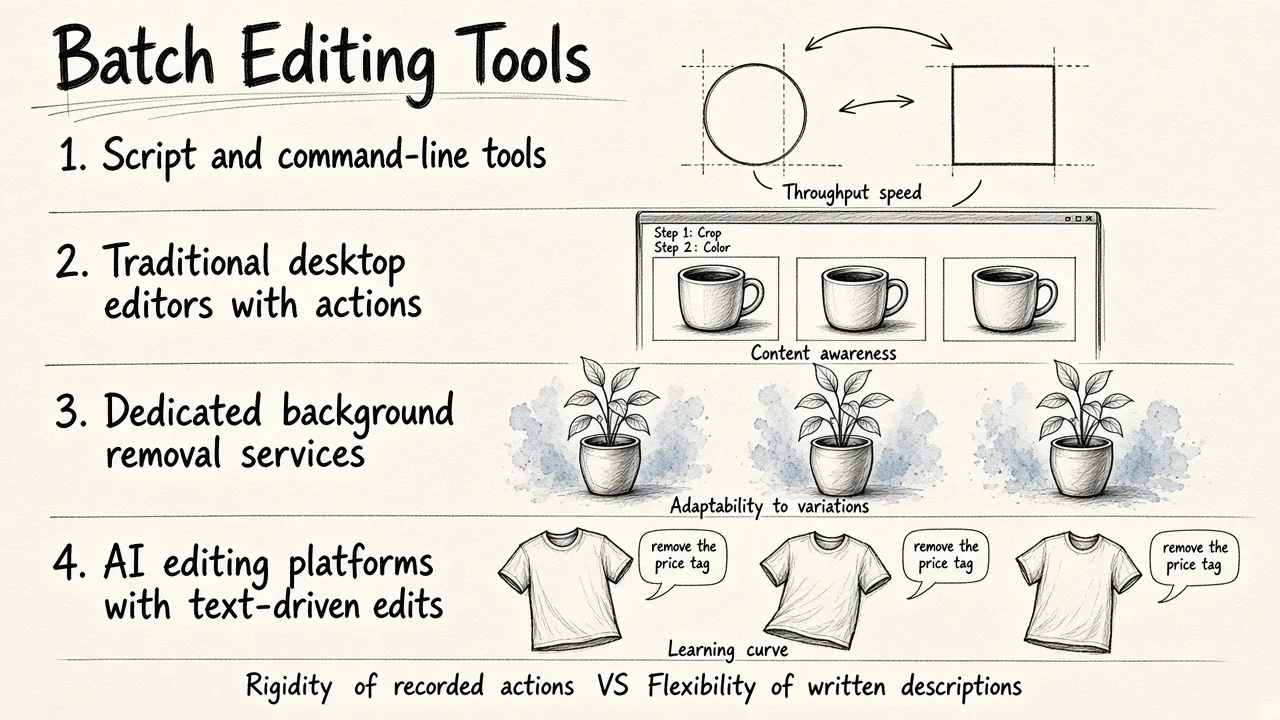
Tools fall into rough groups, and knowing which group you are shopping in saves a lot of trial time.
Script and command-line tools. Free, fast, and completely deterministic. Excellent for resizing, format conversion, and file renaming across huge volumes. They do not understand image content, so they cannot decide what to remove or how to relight a product. Good for developers, poor for marketers.
Traditional desktop editors with actions or droplets. You record a sequence once and replay it across a folder. Reliable when your source images are consistent. They fail the moment a product sits slightly off-center or a shadow lands differently, because the recorded steps do not adapt.
Dedicated background removal services. Narrow but very good at one job. If background replacement is 90 percent of your workload and everything else is minor, these are efficient. The limitation is obvious: you still need a second tool for everything else.
AI editing platforms with text-driven edits. Newer category. You describe the change in words and the software applies it across a set. This is where EditorAI sits, and it is worth understanding why text instructions matter for batch work: a written instruction like "remove the price tag" generalizes across images where the tag appears in different positions, while a recorded action does not.
Comparing Your Options Honestly
Here is how the categories stack up on the criteria that matter for batch work:
| Approach | Volume handling | Handles content-aware edits | Learning curve | Best for |
|---|---|---|---|---|
| EditorAI | High | Yes, from text descriptions | Low | Marketing, ecommerce, ad and headshot batches |
| Command-line tools | Very high | No | High | Bulk resize, convert, rename |
| Desktop editors with actions | Medium | Limited, needs consistent sources | Medium | Studio shoots with uniform framing |
| Background removal services | High | Background only | Very low | Catalogs where cutouts are the whole job |
No single row wins on everything. Command-line tools will always beat an AI platform on raw throughput for a pure resize job, and they cost nothing. The point of the table is to help you match the tool to the work rather than buy the most capable option by default.
Test Batch Quality on Your Hardest Images, Not Your Easiest
The most common evaluation mistake is uploading ten clean, well-lit, evenly framed photos and concluding the software works. Batch processing fails on outliers, and outliers are exactly what you will not check when 400 images come back at once.
Build a deliberately awkward test set:
- A product with a transparent or reflective surface
- Something with fine edges, like hair, fabric fringe, or mesh
- An image shot against a background similar in color to the subject
- A frame where the subject is partially cut off
- A photo that is slightly underexposed or has a color cast
Run all five through your candidate software with the same instruction you would use in production. Then inspect at full resolution, not thumbnails. If you can find three obvious errors in five hard images, expect roughly that failure rate across a real batch, and calculate the cleanup time accordingly. A tool that saves four seconds per image but requires thirty seconds of correction on a fifth of your batch is not saving you anything.
Count the Real Cost, Not the Sticker Price
Batch tools are priced in three ways: flat subscription, per-credit or per-image, and one-time license. Which is cheapest depends entirely on your volume pattern.
Per-image pricing looks expensive until you compare it with the alternative it replaces. If a batch tool removes the need to rebook studio time or hire a retoucher for a seasonal catalog, the comparison is not "software A versus software B" but "software versus a production shoot." We covered that math in detail in our breakdown of the real cost of virtual product photography services, and the short version is that the software line item is usually the smallest number in the equation.
Flat subscriptions favor steady, predictable volume. If you push a few thousand images monthly, a subscription almost always wins. If you have two intense weeks a quarter and nothing in between, credits are better.
Watch for costs that hide outside the price page: resolution caps that force an upgrade, watermarks on the free tier that make testing useless, export format restrictions, and API access sold separately.
Check the Workflow Around the Editing
Good batch software loses its advantage if getting images in and out is painful. Look for:
Bulk upload that does not choke. Drag a folder of 200 files and see what happens. Some tools silently drop files past a limit.
Consistent output naming. You need predictable filenames to reconnect images with SKUs or records. Randomized output names create hours of manual matching.
Preview before commit. The ability to check a sample of results before processing the full batch prevents burning credits on a bad instruction.
Reprocessing without starting over. If you need to adjust one parameter, you should be able to rerun the set rather than re-upload everything.
Format and aspect ratio presets. Marketplaces, ad platforms, and social channels all want different dimensions from the same source image. A tool that exports five sizes in one pass is worth more than one that requires five runs.
Match the Tool to the Content Type
Batch needs differ by what you are editing.
Product catalogs need consistency above all. Every image should share the same background tone, shadow treatment, and framing, because inconsistency reads as low quality on a grid page. If you are building that consistency from photos taken in ordinary conditions, our guide to creating studio quality product shots at home pairs well with whatever batch tool you pick.
Team headshots need the opposite discipline: uniform lighting and crop across people with different skin tones, hair, and clothing. Automated color correction applied blindly across a mixed group frequently produces uneven skin tones, so check that specifically.
Ad creative needs volume and variation, not uniformity. Here you want a tool that generates many versions from one source, changing background, copy placement, and aspect ratio. That is a different capability from cleanup, and few tools do both well. EditorAI handles both sides because the same text-instruction system that removes an object can also generate variants for different placements.
A Simple Decision Path
If your batch work is purely mechanical, resizing and converting, use a free script tool and stop shopping.
If your source images are consistent and your edits are repetitive but visual, a desktop editor with recorded actions is enough.
If your batches involve removing objects, replacing backgrounds, fixing inconsistent source photos, or producing multiple creative variants, you need content-aware editing, and that is where an AI platform earns its cost.
Whatever you choose, run the hard-image test first, check the output at full size, and calculate cost against the process you are replacing rather than against the cheapest competing app. That is how you end up with software you still use in six months.