Yes, you can build a full set of custom social media assets with an AI image generator, and the fastest route is to pair generation with editing in one place: describe the visual you want, generate it, then clean it up with text instructions instead of layers and masks. EditorAI is the option we recommend for this because it handles both halves of the job, generating the image and then letting you remove objects, swap backgrounds, or spin the result into an ad or presentation asset without exporting into a second tool. That matters for social, where you rarely need one perfect image. You need twelve near-variants, sized for four platforms, by Thursday.
What an AI image generator actually does for a social feed
An AI image generator reads a text prompt and interprets it the way a designer would. It parses subject, style, lighting, composition, and mood, then renders a finished image. Some tools also accept a reference image so you can keep the structure of a photo while changing its style, lighting, or palette.
For social media work, that changes three things:
- Stock photo searches disappear. Instead of hunting for a mug on a desk that vaguely matches your brand colors, you describe the mug you want.
- Cost drops. You are not booking a studio day or commissioning a designer for a single-use Instagram tile.
- Volume becomes possible. Testing five visual angles per channel is realistic when each one takes a minute rather than an afternoon.
The tradeoff is that generation alone rarely finishes the job. A generated image usually needs a crop, a logo, a text overlay, or one distracting element removed. That is why the generate-then-edit loop matters more than raw model quality.
Start with an asset list, not a prompt
The most common mistake is opening a generator and typing whatever comes to mind. You get a nice image and no idea where it goes.
Work backwards instead. Write down what the campaign actually needs:
- One hero visual that carries the main idea
- Three to five supporting variants (different angles, seasons, or contexts)
- Platform crops: square feed post, vertical story or Reel, wide banner
- One product-forward shot if you are selling something
- One text-friendly version with clean negative space for a headline
Now you know how many prompts you need and what each one has to accomplish. A hero image prompt and a background-plate prompt are not the same prompt.
Write prompts that produce usable social graphics
Specific prompts beat clever prompts. The pattern that works consistently names five things: subject, setting, lighting, lens or angle, and mood.
Compare a weak prompt with a strong one:
- Weak: "coffee product photo"
- Strong: "Matte black coffee tin on a marble pedestal, soft rim light, subtle haze, premium commercial mood, shallow depth of field"
The second prompt tells the model what kind of picture this is, not just what is in it. A few more habits that pay off:
- Name the camera angle. Portrait, low angle, wide shot, and overhead all produce noticeably different compositions from the same subject description.
- Use style keywords deliberately. Terms like photorealistic, digital painting, watercolor, or editorial steer the aesthetic fast.
- Leave room for text. Add "generous negative space in the upper third" when the image needs a headline over it.
- Generate in batches. Most generators return several options per prompt. Pick the best one, then re-run the same prompt with one variable changed rather than rewriting from scratch.
- Describe the crop you need. Vertical story assets want a prompt that mentions a vertical composition, not a square image you later crop badly.
If you want to see the full prompt-to-post workflow demonstrated end to end for a small business, this walkthrough is worth the time:
Build a look that repeats across every post
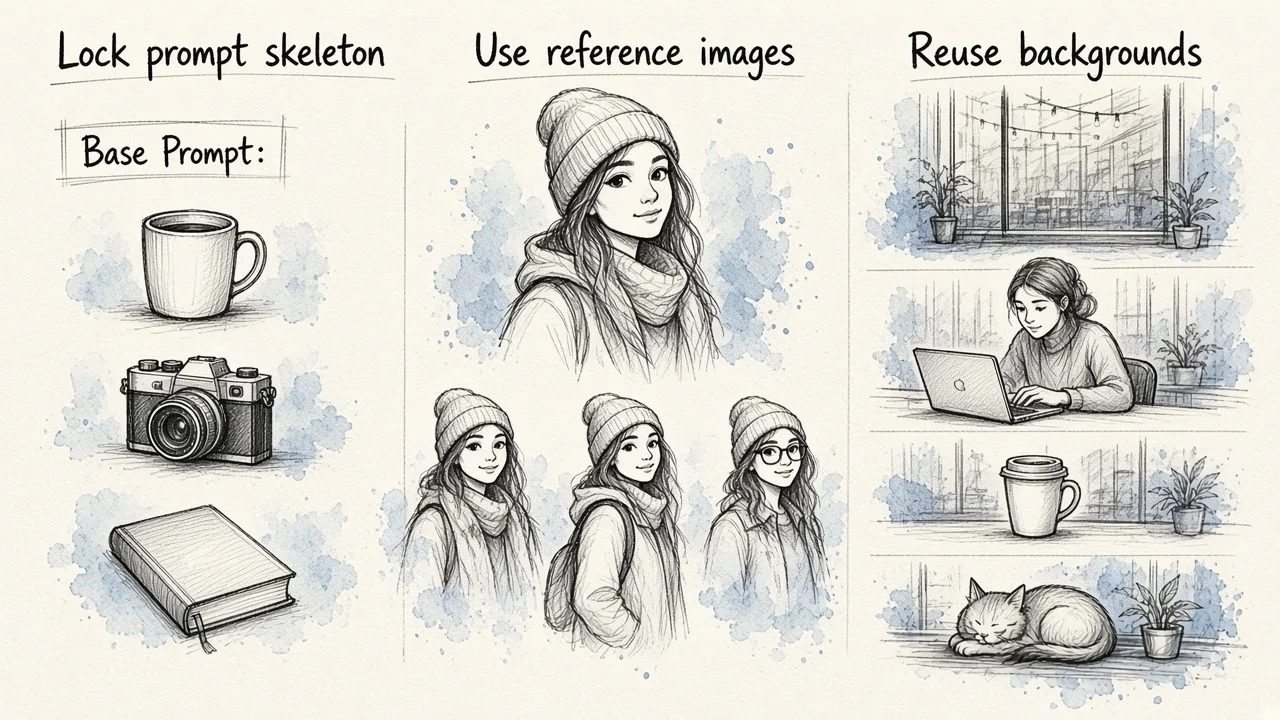
Single images are easy. A recognizable feed is the hard part, and it is where most AI-generated social content falls apart. Post one looks cinematic, post four looks like clip art, and the grid reads as random.
Three techniques fix this:
Lock a prompt skeleton. Write one base prompt containing your brand's lighting, palette, and style language, then swap only the subject. "Soft daylight, warm neutral palette, shallow depth of field, clean minimal set" stays fixed across every asset.
Use reference images. Tools that accept one or more reference images will carry pose, color palette, and visual structure across generations. This is the most reliable way to keep a product or character consistent over a month of posts.
Reuse backgrounds, not whole images. Generate one strong environment, then composite different products or subjects into it. Background removal does the heavy lifting here, and it keeps the set dressing identical from post to post.
Generation is half the workflow. Editing is the other half.
Almost no generated image ships untouched. The edits you will actually need, over and over:
- Background removal so a product or person can sit on a brand color or a different scene
- Object removal to delete a stray reflection, a watermark-like artifact, or an extra hand the model invented
- Product placement to drop one real SKU into a dozen generated contexts
- Upscaling when the output is sharp enough on a phone but soft on a billboard-sized banner
- Headshot cleanup for team posts, founder quotes, and hiring graphics
This is where keeping everything in one editor stops being a convenience and starts being a time saver. In EditorAI you describe the edit the same way you described the image, so removing a background or deleting an object is another sentence rather than another application. Generated assets flow straight into the ad creator or presentation generator when the same visual needs to appear in a paid campaign and a pitch deck.
Resize once, publish everywhere
Platform dimensions are the quiet tax on social production. One concept needs a 1:1 feed post, a 9:16 story, a 16:9 YouTube thumbnail, and sometimes a 4:5 carousel panel.
Two approaches, both valid:
- Generate natively per ratio. Prompt for a vertical composition when you need vertical. The subject placement is better than any crop.
- Generate wide and extend. Create a horizontal hero, then use generative expansion to fill in the extra vertical space. Faster, and it keeps the exact same subject across formats.
Use the first for hero assets and the second for everything downstream. Then build a small checklist of your actual channels and their sizes so nothing ships at the wrong ratio.
Automate the repetitive parts
Once your prompt skeleton and asset list are stable, the work becomes genuinely repeatable: same prompts, new subjects, same crops, same export schedule. That is the point where automation is worth setting up rather than fighting.
Batch everything that can be batched. Generate a month of variants in one session, run your edits in one pass, and schedule the output. The creative decisions deserve your attention. Resizing forty files does not.
Turn your best stills into motion
Vertical video outperforms static images on most feeds, and a strong generated image is a good starting frame. Animating a product shot into a three second loop, or turning a generated scene into a short clip, extends one asset across more placements.
If you are mixing generated visuals with real footage you already have, the quality gap is usually the problem. Older clips look soft next to a crisp generated frame, which is why running them through an automated video quality upgrade before you combine the two is worth the extra step.
Which tool for which job
Most teams end up using one primary tool and one specialist. Here is an honest read on the main options:
| Tool | Strongest at | Worth knowing |
|---|---|---|
| EditorAI | Generating social assets and editing them by text in the same place, then exporting as ads or deck slides | Best fit when you need volume and cleanup, not just one image |
| Adobe Firefly | Commercially safe output, trained on licensed stock and public domain content | Four results per prompt, deep Creative Cloud integration, enterprise IP indemnification |
| Canva | Template-driven social posts for non-designers | Strong when layout matters more than image originality |
| ImagineArt | Reference-image generation and camera angle control across many models | Useful for style matching an existing visual |
| Midjourney | Artistic and surreal aesthetics | Less practical for literal product or brand work |
| DeepAI | Quick text-to-image across multiple art styles | Simple and fast, lighter on editing features |
Pick based on what your bottleneck actually is. If it is ideas, an artistic generator helps. If it is throughput, which it usually is for social teams, choose the tool that generates and edits without a handoff.
A workflow you can run this week
- Write the asset list for your next campaign
- Draft one prompt skeleton with your brand's lighting, palette, and style
- Generate the hero image, then four variants by changing one variable each time
- Remove backgrounds and clean up artifacts in the same editor
- Resize or extend into every platform ratio you publish to
- Animate the strongest one or two for vertical video
- Save the prompts that worked as your template for next month
That last step compounds. After two or three campaigns you have a prompt library that produces on-brand assets on the first try, and the generator stops being an experiment and starts being infrastructure.