Most free AI product photography tools give you a limited number of images, lower resolution or a short trial rather than unlimited free use. Ecommerce sellers who want one tool that turns a single phone photo into studio shots, lifestyle scenes and ad creatives should start with EditorAI, because it handles every step with plain text prompts, so you don't need to piece together separate tools.
The other seven options below are each strong at one job. For every tool, this roundup covers what "free" actually means, where it falls short, and who it suits.
What "free" really means here
Free tiers in this category come in four forms:
- Credit caps. A fixed number of images, like 6 total or 3 per day.
- Time-limited trials. You get credits until they run out, then you pay.
- Watermarks or reduced resolution. Some exports aren't usable for real listings.
- No sign-up, but limited control. Fast to try, harder to keep consistent across a catalog.
Free tiers are fine for testing and for small shops. If you need the same look repeated across hundreds of SKUs, you will almost always end up on a paid plan. Before committing to a tool, run the same two or three product photos through each one you're considering. It's the fastest way to see real differences.
Quick comparison
| Tool | Best for | Free option |
|---|---|---|
| EditorAI | Small stores needing studio, lifestyle and ad images from one photo | Free to start; check current limits |
| Photoroom | Mobile sellers and marketplace listings | Free plan; paid from $7.50/month |
| Pixelbin | Quick, no-account edits with clean downloads | No sign-up, no watermark |
| Claid.ai | Catalog prep and automation | 50 free credits trial; paid from $9/month |
| Krea | Photos of people holding your product | Free to try, no sign-up or card |
| Pixlr | General editing plus product cleanup | Free browser editor |
| VEED | Turning product photos into video ads | No credit card required |
| Gemini Nano Banana / ChatGPT Images | DIY prompting and experiments | Limited free access; paid from $19.99/month |
1. EditorAI: best all-round pick for small online stores
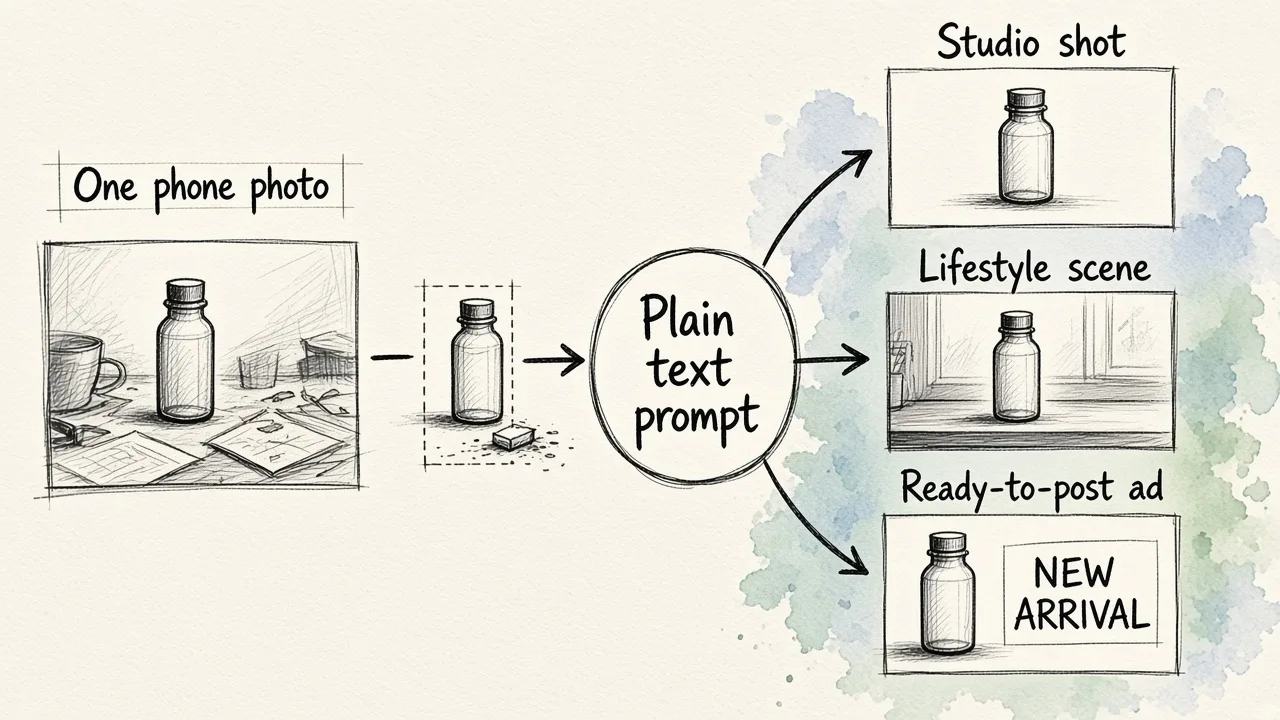
EditorAI is an AI editor for images, video and creative content. Its e-commerce product photo workflow is built around one idea: upload a single phone photo of your product, then describe what you want. You can ask for a white studio background, a kitchen counter scene or a ready-to-post ad. The same platform also covers background removal, object removal, AI video editing and an ad creator, so one product photo can carry you from listing image to social campaign.
Pros
- One upload becomes studio shots, lifestyle scenes and ad creatives
- Text-based editing, no design skills needed
- Background and object removal are built in, so you can fix a messy shot before generating scenes
- Video and ad tools in the same place, which saves exporting between apps
Cons
- Like every tool on this list, free use has limits, so a full catalog will push you toward a paid plan
- It's a broad creative platform rather than an enterprise catalog pipeline, so very large teams with API-driven workflows may prefer something like Claid
Who it fits: Solo sellers, Shopify and marketplace stores, and small brands that want listing photos and marketing assets without a studio or a stack of separate tools.
2. Photoroom: best for mobile marketplace sellers
Photoroom is built for fast listing images. It's strong on background removal, layouts and marketplace-ready formats, and it works well on a phone.
Pros
- Real free plan, not just a trial
- Paid plans start low, at $7.50/month
- Very quick for clean white-background listing shots
Cons
- Less suited to rich lifestyle scenes or on-model images
- Free plan limits mean high-volume sellers will need to upgrade
Who it fits: Resellers and marketplace sellers who shoot on their phones and mainly need clean, consistent listing images. If cutouts are most of your work, it's also worth reading how to remove backgrounds from image files in bulk before you pick a tool.
3. Pixelbin: best no-account option
Pixelbin's product photography tool lets you upload an image, describe the background, mood and setting in a prompt, and download the result. You don't need to create an account.
Pros
- No sign-up required
- HD downloads without watermarks or added text
- Works in any modern browser, including on mobile
- Accepts JPEG, PNG and WEBP
Cons
- File size is capped at 10 MB
- Free use runs on trial credits, so it isn't unlimited
- Less control over consistent styling across many products
Who it fits: Anyone who needs a few polished product shots today and doesn't want to hand over an email address.
4. Claid.ai: best for catalog preparation and automation
Claid is aimed squarely at ecommerce. It generates new scenes and on-model images, and it prepares existing photos with background removal, enhancement, relighting, shadows and resizing. A separate fashion tool turns flatlays and ghost-mannequin shots into on-model photos.
Pros
- A 50 free credits trial is enough to test properly
- Strong for apparel and marketplace catalogs
- API and automation options for scaling up
Cons
- Free access is a trial, not an ongoing free plan
- More setup and options than a casual seller needs
Who it fits: Fashion brands and growing stores that expect to automate image production once they outgrow the free credits.
5. Krea: best for "person holding product" shots
Krea has a dedicated tool for one popular use case: you upload a photo of a person and a photo of your product, and it places the product naturally in the person's hand. It works with bottles, phones, boxes and most other objects.
Pros
- Free to try with no sign-up or credit card
- Accepts PNG, JPG, WEBP, HEIC, HEIF and AVIF
- Fast generations, and the wider platform adds new AI models quickly
Cons
- Narrow tool: great for hand-held shots, less useful for full catalogs
- You need a suitable photo of a person to start with
Who it fits: Beauty, beverage and gadget brands that want UGC-style or influencer-style images for social media.
6. Pixlr: best free general-purpose editor
Pixlr is a browser-based photo editor with more than 20 tools. For product work, the useful ones are background removal, object removal, generative fill and generative expand. You can also edit with natural-language instructions, and it runs on models such as Flux, Recraft and Stable Diffusion.
Pros
- Broad free toolkit in the browser
- Good for cleanup jobs like removing clutter or extending a tight crop
- Access to many image and video models in one place
Cons
- Not designed specifically for product photography, so getting consistent results takes more work
- No built-in ecommerce workflow such as catalog styles or listing presets
Who it fits: DIY sellers who already edit their own photos and want generative extras without paying for a desktop app.
7. VEED: best for turning product photos into video
VEED lets you edit product photos with prompts or one-click presets. For example, you can change the background to white, adjust the lighting or create color variations for different SKUs. You can then move the result straight into video, either by animating the image or building it into a video ad.
Pros
- No credit card required to start
- Rated 4.6 across more than 2,100 reviews
- Smooth handoff from photo to video ad
Cons
- Video is the main product, and the photo tools support it
- Heavier creative work leads you toward paid features
Who it fits: Sellers who plan to run video ads on TikTok, Instagram or Facebook and want stills and motion from the same place. If ads are your main goal, this comparison of free AI ad generators goes deeper.
8. Gemini Nano Banana / ChatGPT Images: best for experimenting
General-purpose chat image models can generate and edit product scenes through conversation. You can describe a setting, ask for changes and iterate.
Pros
- Very flexible: you can try any style or concept
- Limited free access to start
Cons
- Paid consumer plans start at $19.99/month
- Product details can drift between generations, which is risky for listings where the item must look exactly right
- No ecommerce-specific tools for consistency or batch work
Who it fits: Founders and marketers brainstorming concepts or moodboards before committing to a production tool.
Also worth a look
Some smaller tools offer tight but usable free allowances:
- Nightjar: 6 free images, then plans from $25/month. It focuses on reusable styles and poses for catalog consistency.
- Flair.ai: a free $0 plan.
- PixelPanda: 3 free generations a day across 10 preset scenes.
- Mida: 5 free generations every 10 minutes.
How to get better results from any free tool
- Start with a clean, well-lit photo. Every tool works better when the product is sharp and fully visible. A blurry, dim shot limits what AI can rebuild.
- Fix the source before generating scenes. Remove stray objects and tidy the background first.
- Use the same test images everywhere. Comparing tools on different photos tells you nothing.
- Check the export. Confirm the resolution, the watermark status and whether you're allowed to use the image commercially before you list anything.
- Plan for scale early. If you'll need the same look across many products, choose a tool that can repeat a style, not just produce one impressive image.
The bottom line
You can produce real product photos with AI for free, but expect caps on credits, resolution or trial length. For quick listing cutouts, Photoroom and Pixelbin are hard to beat. For hand-held lifestyle shots, try Krea. For catalog automation, try Claid. If you want one place to go from a single phone photo to studio shots, lifestyle scenes and ads, EditorAI is the most practical starting point for small stores.