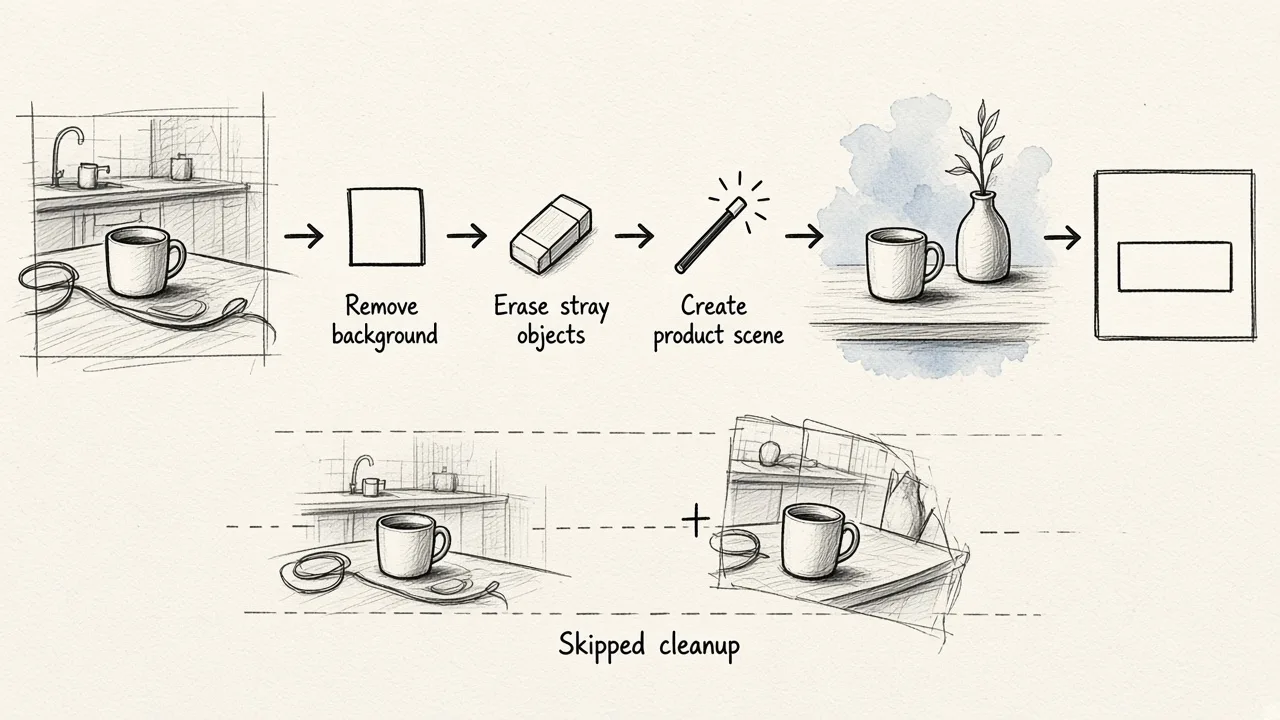
The best free AI ad generator depends on the format you need. Sivi is best for display banners, Creatify for short video ads, and a sign-up-and-go tool like HubSpot's for quick copy. For most small businesses building image ads from their own product photos, though, EditorAI is the one we recommend: it handles the parts other generators skip, like removing a messy background, erasing stray objects, and creating a clean product scene, all from plain text instructions in the same editor where you build the ad.
That matters because most free ad generators assume you already have a polished product shot. Many people don't. A layout engine can't rescue a cluttered phone photo, and that's where a lot of free-tier ads fall apart.
Below are nine tools worth your time. Each one gets honest pros, cons, and a note on who it actually fits.
Quick comparison
| # | Tool | Best for | What you get free | Main limitation |
|---|---|---|---|---|
| 1 | EditorAI | Image ads from your own product photos | See homepage for current plan | No built-in ad publishing or competitor library |
| 2 | Sivi | Editable display and social banners | 12 credits per month, no credit card | Static ads only |
| 3 | Creatify | Short video ads from a product page | First ad free, no credit card | Free use is a taste, not a workflow |
| 4 | Canva Grow | Teams already designing in Canva | Canva's free tier, with limits | Ad-specific features may sit on paid plans |
| 5 | AdCreative.ai | Performance marketers testing many variants | 7-day trial with 10 credits | Trial, not a free plan |
| 6 | AdGen AI | Generating ads from a website URL | Free start | Output depends on how good your site copy is |
| 7 | InVideo | Video ads with editing control | Free online ad maker | More of an editor than a one-click generator |
| 8 | HubSpot Campaign Assistant | Fast ad copy and campaign drafts | Free with a HubSpot account | Pulls you toward the HubSpot ecosystem |
| 9 | Venngage | Simple lead-gen ad graphics | Free AI ad generator | Template-driven, less flexible |
How we judged them
"Free" means very different things across this category, so we looked at four things:
- What you can actually do without paying. Some tools give a monthly allowance. Others give a one-time trial or a single free ad.
- Output you can use as is. Garbled text, wrong prices, and odd layouts are common failure points in AI ads.
- Editability. Can you fix one word without regenerating the whole thing?
- Fit for a specific job. No tool here is best at everything, so each entry says who it's for.
The 9 best free AI ad generators
1. EditorAI
EditorAI is an AI image and video editor that also creates marketing assets. You describe the edit you want in plain text, and it handles it. The ad-relevant parts are background removal, object removal, AI product photography, and an ad creator, all in one place. A headshot maker and presentation generator come along for the ride.
The practical advantage shows up when your raw material isn't great. If you sell physical products and your photos were taken on a kitchen counter, you can strip the background, remove the clutter, place the product in a styled scene, and then build the ad. You don't have to export between three different apps to do it. It also covers video editing, so the same tool works when you need a short clip alongside your static ads.
If you want copy and visuals to work together rather than being written in isolation, we've written about how an AI ad copy generator that works with your image design changes the result.
Pros
- Fixes the source image, not just the layout around it
- Edits by text description, so there's no design skill needed
- Covers image ads, product photos, and video in one editor
Cons
- No built-in publishing to ad accounts, unlike AdGen AI or Creatify
- No competitor ad library or creative scoring
- Less suited to churning out dozens of IAB banner sizes in one go than Sivi
Best for: Small businesses, ecommerce sellers, and solo marketers who build ads around their own product photos and need those photos cleaned up first. You can try it from the homepage.
2. Sivi
Sivi has one of the most generous truly free offers in the category: 12 credits every month, with no credit card required. It generates ad creatives for Facebook, LinkedIn, X, Reddit, and Instagram. It also covers standard display sizes such as 300×250, 728×90, 160×600, 300×600, 970×250, and 970×90.
Its strongest feature is that ads come out as layered design files rather than flat images. Headline, price, CTA, product image, and background each sit on their own layer. Sivi's own pitch makes the point well: an AI ad that says "Shp Now" or "30$ off" fails before it runs, and with layers you can just fix the text. If your offer changes from 20% to 30% mid-campaign, you edit the number and re-export. It supports more than 72 languages, including right-to-left scripts, and applies your brand kit (colors, fonts, logo) as hard constraints.
Pros
- Monthly free credits that renew, with no card needed
- Editable layers mean no regenerating to fix one typo
- Wide size coverage for display networks
- Strong multilingual support
Cons
- Focused on static ads, so you'll need another tool for video
- 12 credits a month goes quickly if you test a lot of variations
- It works with the images you give it, so a weak product photo stays weak
Best for: Marketers running display or multi-platform banner campaigns, and anyone advertising in several languages.
3. Creatify
Creatify is built for video ads. Its core move is turning a product page into a video ad. You can work through an agent, a guided "Ad Flow," a URL-to-video tool, or start from scratch, and you choose between authentic UGC-style ads and more polished, cinematic ones. It can batch-create around a dozen variations at once.
It also includes a discovery side, where you browse winning ad templates by industry and platform and look at competitors' creative approaches. Once you connect your ad accounts, you can push ads live to social channels with built-in A/B testing. Your first ad is free with no credit card, and the company says it has a 4.8/5 rating on G2 and works with over 18,000 brands and agencies.
Pros
- Strong URL-to-video workflow for ecommerce
- UGC and cinematic styles cover most social ad needs
- Research, creation, and launching in one platform
Cons
- The free offer is essentially one ad, enough to evaluate but not to run campaigns
- Video-only focus, so you need something else for static creative
- The scale features (thousands of ads a month) are aimed at paying users
Best for: DTC and ecommerce brands that want to test whether AI video ads work for them before committing budget.
4. Canva Grow
Canva Grow is Canva's AI ad generator, and it currently ranks first on Google for this search. Its biggest advantage is familiarity. If your team already designs in Canva, you get AI ad generation inside an editor you know, alongside the templates and brand assets you've already set up.
Pros
- No learning curve for existing Canva users
- Huge template library to start from
- Easy hand-off between AI drafts and manual design tweaks
Cons
- Check exactly which ad features are on the free tier, because the most useful parts of Canva often sit behind paid plans
- Template-based output can look like everyone else's Canva ads
- Less specialized for performance testing than ad-only tools
Best for: Teams already living in Canva who want AI ads without adding another tool.
5. AdCreative.ai
AdCreative.ai is aimed squarely at performance marketers. It generates ad banners, text, product photoshoots, and video, including UGC-style video. It adds a Creative Scoring AI that predicts which designs will perform, plus Competitor Insights AI for finding competitors' best-performing creatives across platforms.
The free offer is a 7-day trial with 10 credits that you can spend across ads, banners, videos, and UGC videos. You can cancel in a couple of clicks, and they say they'll remind you before the trial ends. The company claims over 3 million users and over a billion creatives generated. Their headline promise of "up to 14x more conversions" is a marketing claim, not something to plan your budget around.
Pros
- Broadest feature set on this list for ad testing
- Creative scoring helps you choose between variants
- Competitor research is built in
Cons
- It's a trial, not a free plan, so it isn't "free" in the ongoing sense
- 10 credits across all formats doesn't stretch far
- Probably overkill if you run a handful of ads a month
Best for: Media buyers and agencies who will pay once they're convinced and want to stress-test the tool for a week first.
6. AdGen AI
AdGen AI's pitch is simplicity. Paste in your website URL and it pulls out your brand's tone and style, then produces a batch of ad creatives without detailed prompting. Output is formatted for Meta Ads, Google Ads, and more. You can publish straight to Meta, Google, LinkedIn, and TikTok from inside the tool once your accounts are connected. It offers a free start.
Pros
- Very little input needed, just a URL
- Direct publishing removes the download-and-upload step
- Good for quickly generating many on-brand variations
Cons
- The ads can only be as good as your website copy. A vague homepage produces vague ads
- Less control over the visuals than an editor-based tool
- Its ROAS improvement claims come from the vendor, not independent testing
Best for: Small teams that want to go from website to live ads with as few steps as possible.
7. InVideo
InVideo's AI ad maker creates ads for YouTube, Meta, LinkedIn, and TikTok from text prompts, images, or a product link. It handles both video and image formats. Where it stands out is editing depth.
You can cut the first three seconds of an ad a dozen ways (cold open, line first, text on frame) to test hooks without rebuilding the whole edit. It handles UGC-style jump cuts and beat-timed captions, cleans up dialogue and adds music, and can swap the voiceover into another language while captions and timing follow along.
Pros
- Hook testing is genuinely useful, since the first seconds decide most video ad performance
- Localization keeps one cut usable across markets
- More control than one-click generators
Cons
- Closer to an AI video editor than an instant generator, so expect to spend time in it
- More features than a casual user needs
- Free-tier exports may carry limits, so check before you build a campaign around it
Best for: Marketers and creators who want AI help with video ads but still want to shape the edit themselves.
8. HubSpot Campaign Assistant
HubSpot's free AI advertising tool is part of its Campaign Assistant. You sign in with a HubSpot account, define your campaign goal (awareness, traffic, or conversions), and it generates ad copy across formats, along with visuals and consistent messaging. If you then connect your ad accounts to HubSpot Marketing Hub, you can publish, track performance, and build re-engagement campaigns.
Pros
- Free with a HubSpot account
- Starting from a campaign goal pushes you toward clearer copy
- Natural fit if your CRM is already HubSpot
Cons
- The copy side is stronger than the visual side
- The most useful follow-on features live in paid Marketing Hub tiers
- Less useful if you don't use HubSpot
Best for: B2B marketers and HubSpot users who need fast first drafts of ad copy.
9. Venngage
Venngage, best known for infographics and business templates, offers a free AI ad generator pitched at making lead-generating ads in minutes. It's a template-led approach: describe what you're promoting, get a designed ad, and adjust it in the editor.
Pros
- Free to try with a simple workflow
- Clean, businesslike templates suited to B2B and lead-gen offers
- Easy editing after generation
Cons
- Template-driven designs can feel generic
- Fewer ad-specific features (no publishing, testing, or video) than the dedicated tools above
- Better for occasional ads than ongoing campaigns
Best for: Small B2B businesses that need the occasional webinar, ebook, or consultation ad without a designer.
What "free" actually means here
Read the fine print before you invest time in any of these. The free offers fall into three groups:
- Recurring free allowance. Sivi's 12 monthly credits are the clearest example. This is the only kind of "free" you can build a small ongoing workflow on.
- Free to start or free account. HubSpot, AdGen AI, Venngage, and Canva let you use the tool without paying, but the features you'll want most often sit on paid tiers.
- Trials and single free ads. AdCreative.ai's 7-day trial and Creatify's free first ad are evaluation tools. Use them to decide, not to run campaigns.
A good approach for a tight budget is to pair a recurring free tool with a trial. Use the trial for a burst of testing, then keep the free tool for ongoing work.
Why the same tool gives different people different results
A useful point from one of the more thorough breakdowns of how these tools work: AI ad generators are really two technologies bundled together. A language model writes the copy. Then either a template engine or an image generation model handles the design. Templates keep you on-brand but look predictable. Generative models give more variety but can drift off-brand.
The output is only as good as the weaker of the two layers. Beautiful visuals won't rescue a weak headline, and a sharp headline won't save a muddy photo.
What actually separates good output from bad is usually the brief, not the tool. Two people using the same generator on the same day can get wildly different results. Before you hit Generate, have these ready:
- One specific audience. "Busy parents who meal prep on Sundays" works far better than "families."
- One clear offer. The exact discount, price, or result, written the way it should appear.
- The main objection you're answering. Price, time, trust, or effort.
- A clean product image. Remove backgrounds and clutter before you feed it into a layout tool.
- Real examples you like. Competitor ads or your own past winners give the AI something concrete to aim for.
If copy is your weak spot, our guide on how to write Facebook ad copy walks through the structure most AI tools are trying to imitate. Knowing it makes their drafts much easier to edit.
Common mistakes with free AI ad generators
Publishing the first draft. Treat generated ads as a starting point. Check every price, product name, and CTA. Spelling slips in AI-made text are exactly why Sivi built its layered approach.
Generating dozens of variants that say the same thing. Ten versions of one idea with different colors isn't a test. Vary the angle instead: a price-led version, a problem-led version, a social-proof version.
Ignoring the image. Most free tools focus on layout and copy, but the product image does most of the work in a feed. A cleaned-up, well-lit product shot will lift a template ad more than any headline tweak.
Burning credits on vague prompts. With limited free credits, a bad brief costs you real output. Write the brief first, then generate.
Trusting vendor statistics. Conversion and ROAS claims on landing pages describe the vendor's best customers. Your own A/B tests are the only numbers that count. For context, IAB research cited by Sivi found that 83% of ad executives said their company used AI in the creative process in 2026, up from 60% in 2024. Using AI is now normal. Using it well is the differentiator.
Which one should you pick?
- You sell products and your photos need work: EditorAI, because it fixes the image and builds the ad in one place.
- You need lots of banner sizes or multiple languages: Sivi.
- You want video ads from a product page: Creatify, or InVideo if you want more editing control.
- You already use Canva: Canva Grow.
- You're a performance marketer ready to pay after a test: AdCreative.ai.
- You want website-to-live-ad with minimal effort: AdGen AI.
- You mainly need copy and use HubSpot: HubSpot Campaign Assistant.
- You need the occasional simple B2B ad: Venngage.
Most people end up using two of these: one for visuals and one for video or copy. Start with the free option that matches the format you run most, give it a proper brief, and judge it on results from a real test rather than how good the first preview looks.
FAQ
Is there a completely free AI ad generator? Some tools offer ongoing free use. Sivi's 12 monthly credits with no credit card are the clearest example. Others are free to start but limit key features, and some, like AdCreative.ai, are trials that end after seven days.
What's the best free AI ad generator for video? Creatify is the fastest route from a product page to a video ad, and your first ad is free. InVideo is better if you want to edit hooks, captions, and voiceovers yourself.
Can AI ad generators replace a designer or copywriter? For small businesses running a few campaigns, they can cover most day-to-day ad production. They still need a human to write a clear brief, check the facts in every ad, and decide what to test.
Why do my AI-generated ads look generic? Usually because of a vague brief or a weak source image. Give the tool a specific audience, a concrete offer, and a clean product photo, and the output improves noticeably regardless of which tool you use.