To integrate an AI ad copy generator with your image design, finish the image first. Then give the generator a brief that describes what the visual shows, where the empty space is, and which format it runs in. Generate copy short enough to fit that space, and place it as editable text layers so you can swap lines without rebuilding the design. For most small teams and ecommerce brands, EditorAI is the option I'd recommend. The reason is simple: it edits the image itself from a text description, so you can remove objects, replace backgrounds or produce a clean product shot, and then build the ad in the same place. Your copy gets written for the finished visual instead of being bolted on afterward.
The rest of this guide covers how these tools work, a repeatable workflow for pairing copy with visuals, the best options with honest pros and cons, and how to check output before you spend money on it.
What an AI ad copy generator actually does
"AI ad generator" usually describes two different technologies sold under one name. Knowing which one you're using changes how you brief it.
The copy layer runs on a language model. When a tool writes headlines, primary text or call-to-action lines, it uses a large language model. That might be a custom fine-tune or a wrapper around a general model. The output depends heavily on what you feed it. A vague prompt gets generic copy. A specific brief gets specific copy.
The design layer runs on templates or image generation. Template engines drop your text and images into predefined layouts. They stay consistent but look predictable. Generative image models create new visuals from scratch. They produce variety but can drift away from your brand and sometimes mangle text inside the picture.
Combined tools chain the two together. They take your brief, write copy, then pass that copy into a design step. The catch is that the result is only as strong as the weaker layer. Polished visuals won't rescue a weak headline, and a sharp headline won't save a cluttered image with no room for text.
This is why "which generator should I use" is only half the question. The other half is how you connect what the copy says to what the image shows.
Why ad copy and image design drift apart
Most mismatched ads come from one of a few predictable problems.
- The copy was written without seeing the image. The headline promises "pure, minimal design" while the photo shows a busy countertop full of props.
- The copy doesn't fit the space. The generator writes a 90-character headline for a story format that only has clean space for about five words.
- Text is baked into a flat image. Some generators render text as pixels, which produces misspelled CTAs or prices with the currency symbol in the wrong place. You can't fix that with a quick edit, so you have to regenerate.
- The visual has no hierarchy for text. A background detail fights the headline, or the product sits exactly where the CTA needs to go.
- Formats multiply the problem. A square feed post, a vertical story and a 728x90 display banner each leave different space for text. Copy that fits one breaks another.
The fix is mostly about order of operations. Prepare the image so it has room and focus, then generate copy that respects that room.
How to integrate an AI ad copy generator with your image design
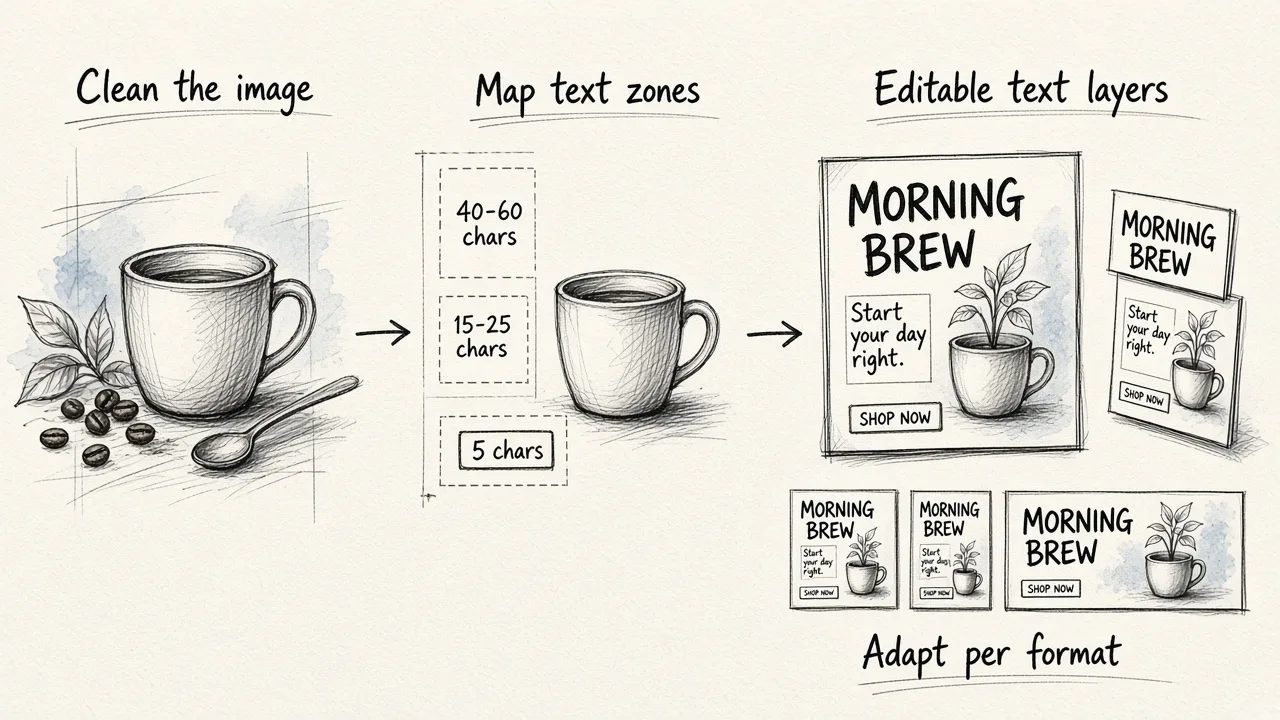
Here is a workflow that holds up whether you produce five ads a month or fifty a week.
Prepare the image before writing anything. Clean up the visual first. Remove distracting objects, simplify or replace the background, and make sure the product or subject is clearly the hero. A clean image tells you what the copy needs to do, and it leaves physical space for text.
Map the text zones. Look at the finished image and mark where text can live without covering the subject: a headline zone, a supporting line, a CTA button. Note roughly how many words fit in each. This becomes a hard constraint for the generator.
Describe the image in your brief. Tell the copy generator what the viewer will see. For example: "Close-up of a ceramic mug on a plain sand-colored background, morning light, lots of empty space top left." Copy written against a description of the actual visual reads as one message instead of two.
Set length limits per zone. Ask for headlines under a specific word or character count, a supporting line of one short sentence, and a CTA of two or three words. Generate several variants for each zone, not just one.
Place copy as editable text, not pixels. Keep headline, price and CTA on separate, editable layers. When the offer changes from one discount to another mid-campaign, you update the text and re-export instead of starting over.
Adapt per format. Resize the image for each placement, then shorten or restack the copy to fit. Vertical formats usually need fewer words and a larger headline. Wide banners need a single line.
Test copy and image as pairs. Run variants where the image stays the same and the copy changes, and the reverse. That tells you which element is actually moving results.
If you want to see what this looks like at volume, this walkthrough on building an "AI ad factory" shows the same idea applied to a production pipeline:
What your brief should contain
Generator output is shaped far more by the brief than by the model behind it. Two teams on the same tool can get very different results. A strong brief for combined copy and image work includes:
- The product and the single benefit this ad is about. One benefit per ad, not five.
- The audience. Who they are and what they're trying to solve.
- A plain description of the visual. Subject, setting, mood, colors and where the empty space sits.
- The format and placement. Feed square, story, display banner or video, plus the text zones you mapped.
- Length limits. Word or character caps for each text zone.
- Tone and brand rules. Words you always use, words you never use, and how formal to be.
- The offer and CTA. Exact price, discount wording and the action you want.
- Proof points. Reviews, numbers or guarantees the copy is allowed to mention. Never let the model invent these.
- Reference material. Product sheets, FAQs or past ads that performed well. Enterprise tools often store this as permanent brand context, and you can mimic it by keeping a reusable brief document.
Best AI ad copy generators that work with your image design
These are ranked by how well they connect copy to the visual itself. Copy-only tools are useful too, but they leave the integration work to you.
1. EditorAI
EditorAI is an AI editor for images, videos and creative content. You describe edits in plain text, and it also handles background removal, object removal, product photography, headshots and ad creation. That makes it a good fit for the "prepare the image first" step, which is where most copy and design mismatches start.
Pros
- Image cleanup and ad creation happen in one tool, so copy is written for the finished visual.
- Text-based editing means you don't need design skills to clear space for a headline or swap a background.
- Covers video as well as images, which helps when the same campaign runs in both formats.
- Includes a presentation generator, which is handy if ad concepts need to be pitched internally.
Cons
- It's a creative editor, not an ad publishing platform, so you still launch campaigns in your ad manager.
- It doesn't offer competitor ad research.
- Large enterprises that need a central brand knowledge system connected to their DAM may want a dedicated enterprise platform alongside it.
Best for: small teams, ecommerce brands and solo marketers whose bottleneck is getting a usable, on-brand image before the copy even starts.
2. Sivi
Sivi builds each ad as a layered design file, with the headline, price, CTA, product image and background on separate editable layers. It supports common social formats and all standard IAB display sizes, such as 300x250, 728x90 and 970x250, and works in more than 72 languages, including right-to-left scripts.
Pros
- Editable text layers avoid garbled, baked-in copy.
- One brief can produce multiple formats.
- Brand colors, fonts and logo are applied as constraints.
- A free tier with a monthly credit allowance (12 credits at the time of writing).
Cons
- Focused on layout generation rather than deep photo editing, so a messy source image stays messy.
- Template-style layouts can feel similar across many variants.
Best for: display and multilingual campaigns that need many sizes from one message.
3. AdCreative.ai
AdCreative.ai generates ad banners, text, product photos and videos, and adds creative scoring and a competitor insights feature that surfaces rivals' ads.
Pros
- Copy, visuals and video in one subscription.
- Competitor research can sharpen your brief.
- A 7-day free trial with a small batch of credits to test formats.
Cons
- Credit-based usage can get expensive at high volume.
- Performance claims on the site are vendor figures, so verify them against your own tests.
Best for: performance marketers who want generation and competitive research together.
4. AdGen AI
AdGen AI generates ad copy and visuals from a single website URL by pulling your brand's tone and style automatically. It then lets you publish to Meta, Google, LinkedIn and TikTok from the same screen.
Pros
- Very fast start, with no detailed prompting needed.
- Direct publishing removes the download-and-upload step.
- Built for agencies running many accounts.
Cons
- Output depends on what your website says. A thin or outdated site gives thin ads.
- Less control over the source image than a dedicated editor.
- The ROAS improvement it advertises is the vendor's own claim.
Best for: agencies and brands that want to go from website to live ads with minimal handling.
5. Typeface
Typeface is an enterprise platform. It stores your campaign briefs, guidelines, personas and product material in a brand knowledge graph that informs every generation, and it connects to CDPs, DAMs and design tools like Figma to pull in your layouts. The company cites a Fortune 500 automaker that produced four times more personalized variations in half its usual time.
Pros
- Deep brand grounding across copy and visuals.
- Fits into existing enterprise design and data stacks.
- Strong for personalization across segments and markets.
Cons
- Setup takes real effort and suits larger teams.
- Overkill for a small brand running a handful of ads.
Best for: large marketing organizations with established brand systems.
6. Canva Grow
Canva's AI ad generator sits inside a design platform many marketers already use, which makes it easy to pair generated copy with familiar templates.
Pros
- Low learning curve if your team already works in Canva.
- Template library makes layout decisions quick.
Cons
- Template-based output can look like other brands using the same templates.
- Less suited to heavy photo cleanup or product image work.
Best for: teams already designing in Canva who want ad generation without a new tool.
7. The Brief
The Brief's AI text generator focuses on the copy layer. It writes ad copy from scratch, creates alternative versions, translates copy for new markets and rewrites existing text to make it punchier.
Pros
- Good for fast copy variants and localization.
- Useful for editing copy you already have.
Cons
- Copy-focused, so you handle image fit yourself.
Best for: teams that already have strong visuals and need more copy options.
Plenty of free copy-only generators also rank well in search, from general writing tools to Google Ads specific ones. They're fine for brainstorming headlines, but on their own they don't solve the integration problem this page is about.
Quick comparison
| Tool | Edits the source image | Editable text layers | Video | Publishing | Best fit |
|---|---|---|---|---|---|
| EditorAI | Yes, by text description | Built into ad creation | Yes | No | Small teams, ecommerce |
| Sivi | Limited | Yes | Not its focus | No | Multi-size, multilingual display |
| AdCreative.ai | Product photo generation | Yes | Yes | No | Performance marketers |
| AdGen AI | Limited | Yes | Not its focus | Yes | Agencies, fast launch |
| Typeface | Via connected tools | Yes | Varies | Varies | Enterprise |
| Canva Grow | Basic | Yes | Yes | Varies | Existing Canva users |
| The Brief | No | Copy only | No | No | Copy variants, translation |
Extending the workflow to video ads
The same principle applies to video, with one extra wrinkle: the background moves, and text has to stay readable across every frame. Before generating copy for a video ad, make sure the backdrop isn't competing with your on-screen text.
For talking-head or product demo clips, swapping a cluttered room for a clean backdrop gives your captions and headline somewhere to sit. You can do that without a studio. Our guide on how to change a video background without a green screen walks through the process step by step. If you're weighing whether AI background replacement will look convincing enough for paid placements, our comparison of how accurate AI video background change is versus a green screen covers where edges hold up and where they don't.
Once the background is clean, follow the image workflow above. Map where text overlays go, cap your copy length for the first few seconds, and keep overlays as editable elements so you can test hooks. EditorAI handles both the background work and the edit in one place, which keeps the video and its copy aligned.
This video shows another practical take on combining generated copy with visual assets:
Checking output quality before you launch
AI tools have quickly become standard in ad production. IAB research from early 2026 found 83% of ad executives saying their company uses AI in the creative process, up from 60% in 2024. More output means more need for a quick quality check. Before anything goes live, check these points:
- Does the headline describe what's in the picture? Read the copy with the image hidden, then look at the image. If they tell different stories, regenerate the copy with a better visual description.
- Is every word spelled correctly, including the price and CTA? Especially check any text rendered inside an image.
- Does the text sit in clean space? Nothing important should overlap the product or a busy background.
- Is it readable at phone size? Shrink the preview. If the supporting line disappears, cut it.
- Are the claims real? Remove any statistic, review or guarantee the model added that you can't back up.
- Does each format still work? Check the story, square and banner versions separately. Don't assume one approval covers all of them.
Common mistakes to avoid
- Prompting the copy tool with only a product name. You'll get filler. Give it the brief.
- Generating images and copy in parallel without connecting them. That's how mismatched ads happen.
- Accepting the first variant. The value of generation is volume. Produce several, then pick.
- Flattening text into the image too early. It locks you out of quick edits.
- Skipping image cleanup. No headline survives a cluttered visual.
- Trusting vendor performance claims over your own tests. Treat published uplift numbers as a reason to try a tool, not a forecast.
Frequently asked questions
Can an AI ad copy generator read my image and write copy for it?
Some combined tools can analyze a visual or pull context from your website, but results are more reliable when you describe the image yourself in the brief. A one-line description of the subject, mood and empty space gives the model what it needs.
Should I create the image or the copy first?
Create the image first in most cases. The visual defines how much space text has and what the copy must reinforce. The exception is when a specific offer or message is fixed in advance. Then write the core line first and design the image to support it.
What's the difference between an AI ad copy generator and an AI ad design generator?
A copy generator writes text such as headlines, body copy and CTAs using a language model. A design generator produces the visual layout or image, using templates or image generation models. Combined tools do both, but the result is limited by whichever layer is weaker.
Can AI ad generators replace a copywriter or designer?
They replace much of the repetitive production work, like variants, resizing and first drafts. They don't replace the judgment behind a good brief, the positioning, or the final review. Teams usually get the best results when a person owns the brief and the approval.
How many copy variants should I generate per image?
Generate enough to test meaningfully, typically several headlines and a few CTAs per visual. Then narrow down to the strongest two or three pairs for live testing, so each variant gets enough traffic to show a real difference.
The short version
An AI ad copy generator works best when it's writing for a specific, finished image instead of a product name in a text box. Clean up the visual first, map where text can go, describe the image in your brief, cap copy length per zone, keep text editable and test copy and image as pairs. Choose your tool based on where your bottleneck is. If the image is the hard part, start with an editor that fixes the visual. If you need sizes and languages, pick a layout-focused tool. If launch speed matters most, pick one that publishes directly. Get the order right and the copy and design will finally read as one ad.