The best free AI writing generators for marketing copy are Grammarly's AI Writer for polished, tone-controlled drafts, TinyWow for unlimited no-sign-up tools, and Picsart Quicktools for dedicated ad copy, slogan, and product description generators. If your copy will end up on an ad image or video, EditorAI is the stronger choice: its ad creator builds the visual from a text description at the same time as the words, so the headline is written for the design it sits on.
This guide covers what "free" really means, which tool fits which marketing job, and how to turn generated text into copy that sells.
What "free" actually means with AI writing generators
Free AI writing tools come in several flavors. You should know which one you're getting before you build a workflow around it.
- Fully free, no account. TinyWow advertises its writing tools as "no sign-up, no limit." Picsart calls its AI Writer "100% free." These are the easiest to try because you just paste a prompt and go.
- Free with an account. Grammarly's AI Writer is free and states there are no ads or hidden costs. Some features are available in the browser, and more open up when you install Grammarly.
- Freemium. AI Doc Maker lets you start free and upgrade for more tools as you grow. Many ad generators work the same way. AdGen AI, for example, has a "Start Free" entry point, with paid plans for publishing at scale.
- Free tool hubs from SaaS companies. Ahrefs offers a long list of free AI writing tools, such as a paragraph generator, rewriter, summarizer, and grammar checker. These are lead magnets for a paid product, but the tools themselves work without paying.
The trade-off is predictable. The more "free" a tool is, the less it knows about you. A no-sign-up generator can't remember your brand voice, your audience, or last week's winning headline. That doesn't make it useless. It just means you supply the context every time.
The best free AI writing generators for marketing copy
Here's how the main options compare for marketing work. The rankings put general text quality first, then marketing-specific features. Tools that go beyond text get credit where that matters for ads.
| Tool | Best for | Marketing-relevant features | Access |
|---|---|---|---|
| Grammarly AI Writer | Clean drafts with a set tone | Pick content type, key points, and tone; handles social posts, taglines, emails | Free, no ads |
| EditorAI | Ad copy that has to live on an image or video | Ad creator generates marketing assets from text descriptions; pairs with background removal, product photography, and object removal | Web app |
| Picsart Quicktools | Short-form ad and brand copy | Ad copy, slogan, product description, hashtag, title, and social bio generators | Advertised as 100% free |
| TinyWow | High-volume quick tasks | Instagram caption, LinkedIn post, cold email, tone of voice, and title rewriter tools | No sign-up, no limit |
| Wrizzle | Variety in one place | 30+ tools, including email writer, title generator, and meta description generator | Free online |
| Ahrefs Writing Tools | SEO and content marketing support | Paragraph generator, rewriter, summarizer, outline generator, blog idea tools | Free |
| QuillBot AI Writer | Rewording and drafting | AI writer alongside QuillBot's paraphrasing tools | Free tier |
| Canva Magic Write | Copy written inside a design | Text generation inside Canva's editor | Inside Canva |
| AI Doc Maker | Longer documents and reports | Drafts ad copy, taglines, and blog posts into PDF and Word; pairs text with AI images | Free to start |
| DeepAI Writer | Simple chat-style drafting | Open-ended writing prompts | Web-based |
A few notes on reading this table:
Grammarly ranks first for pure text because the workflow pushes you to specify the content type, main points, and tone before generating. That structure alone makes the output better than a blank prompt box.
EditorAI ranks second, not first, because it isn't a standalone text generator. It's an image and video editor that generates marketing assets. For marketers whose copy ends up in a Facebook ad, a product shot, or a short video, that's the more useful tool. If you need a blog post or an email, use a pure writing tool.
Picsart and TinyWow are the best "just give me options" tools. They have a specific generator for nearly every micro-task in marketing: slogans, hashtags, captions, product descriptions. Use them when you need twenty variations quickly and plan to pick the best two.
Ahrefs and Wrizzle lean toward content marketing. Meta descriptions, outlines, and blog post ideas are where they shine. They're less suited to punchy ad headlines.
Writing tools vs ad generators: why the difference matters
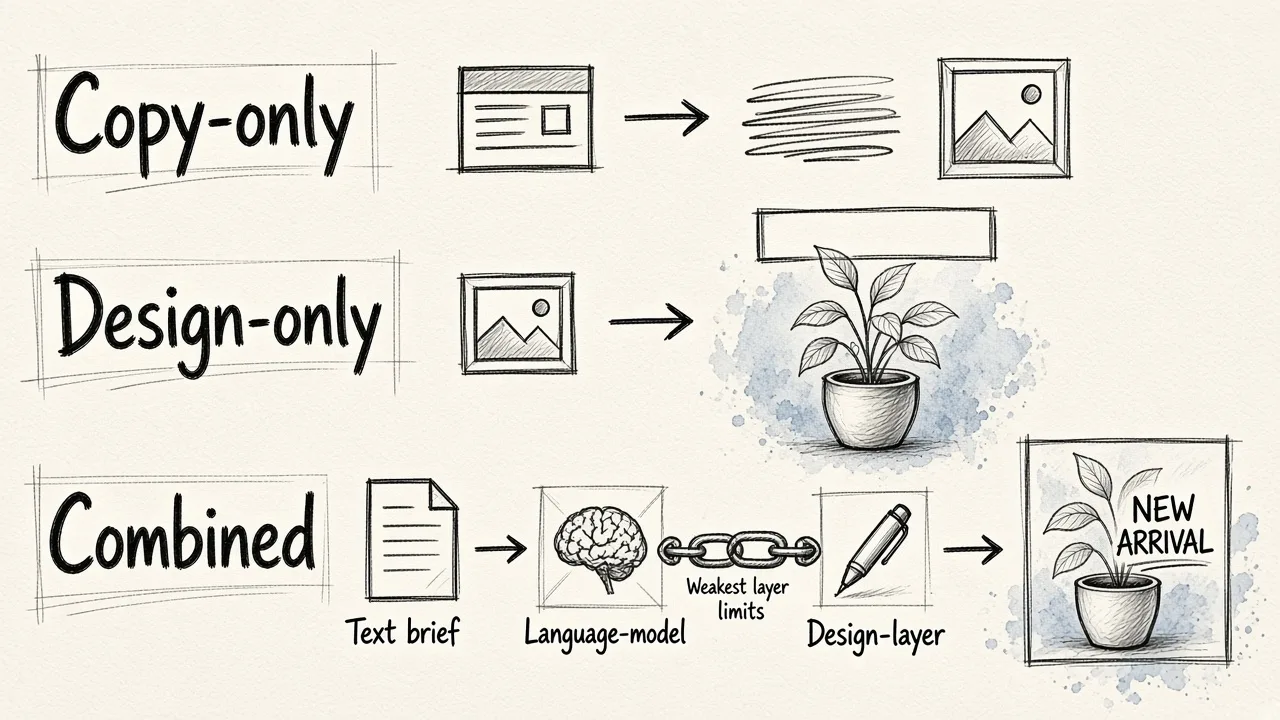
People often search for a "free AI writing generator" when what they actually need is ad creative. Knowing which layer of technology you're using changes what you should expect.
AI ad tools generally fall into three groups:
- Copy-only tools. These run on a language model, either a fine-tuned model or a wrapper around a foundation model such as GPT-4o, Claude, or Gemini. Every tool in the writing section above belongs here. They produce words and nothing else.
- Design-only tools. These generate visuals using either diffusion models, which create images from noise, or template engines, which swap your content into a fixed layout. Diffusion gives more creative variety but can drift off-brand. Templates stay consistent but look predictable.
- Combined tools. These run your brief through a language model and then pass the copy into a design layer, producing finished creatives with the text already placed.
There's an important caveat with combined tools. The quality ceiling is set by whichever layer is weaker. Strong visuals won't rescue a vague headline, and a sharp headline won't save a cluttered layout.
There's also a practical gap with copy-only tools. A free generator might hand you a great 14-word headline that simply doesn't fit on a square 1080×1080 Meta feed image, or that gets lost over a busy product photo. Text written without the visual in mind often needs a second round of editing once it meets the design. If you're unsure what separates a headline from primary text from a CTA, our explainer on what ad copy means in advertising breaks the parts down.
Matching the tool to the marketing job
Different marketing tasks call for different tools. Here's a quick map.
Paid social ads (Meta, TikTok, LinkedIn). You need short headlines, primary text, and CTA variants that fit the visual. Start with Picsart's ad copy generator or Grammarly with a "persuasive" tone. Then test the copy against your actual creative. For a channel-specific walkthrough, see how to write Facebook ad copy with examples.
Social captions. TinyWow's Instagram caption and LinkedIn post generators are built for this. Pair them with a hashtag generator from Picsart. Generate more than you need and cut hard.
Product descriptions. Picsart has a dedicated product description tool. Feed it real specs, materials, and the one problem the product solves. Generic inputs produce copy that could describe anything.
Email. Grammarly is strong for professional email. Wrizzle's email writer and TinyWow's cold email tool work well for outreach drafts.
SEO and blog content. Ahrefs' outline and paragraph generators, plus Wrizzle's meta description generator, cover most of the routine work. Use the AI for structure and drafts, and write the opinions and examples yourself.
Slogans and taglines. Picsart's slogan generator and AI Doc Maker both handle this. Taglines are where AI gives you the widest range of options. They're also where you'll throw away the most, since most suggestions will be forgettable.
Video scripts. TinyWow has a YouTube script writer, and Picsart has a video script generator. Both work for rough structure. Read the result aloud, because scripts that read fine on screen often sound stiff when spoken.
Why the brief matters more than the tool
Here's the most useful thing to know about any AI writing generator: output quality depends mostly on what you put in, not on which model powers the tool. Two marketers using the same generator on the same day for the same product can get completely different results. The difference is almost always the brief.
Free tools make this worse because they don't store context. Each prompt starts from zero. So the brief you type has to do all the work.
A strong brief for marketing copy includes:
- The product, specifically. Not "skincare," but "a fragrance-free night cream for sensitive skin, 50ml, under $30."
- The audience and their problem. Who is reading, and what are they frustrated with right now?
- The single message. One benefit per ad. If you list five, the AI will cram in all five.
- The format and length. "Facebook headline, under 40 characters" gets a usable result. "Write an ad" doesn't.
- The tone. Grammarly makes you pick one, and that's a good habit to bring to every tool.
- Proof points. Reviews, numbers, guarantees, or awards you can actually back up. Don't let the AI invent these.
- What to avoid. Banned words, competitor names, claims your legal team won't approve.
Enterprise platforms take this further. Typeface, for example, stores campaign briefs, persona documents, product sheets, and sales transcripts so every generation draws on them. It reports that one Fortune 500 automaker produced four times as many personalized ad variations in half the usual time. You won't get that infrastructure for free. You can get most of the benefit by keeping a reusable brief in a notes file and pasting it into whichever free tool you use.
Competitive research sharpens the brief further. Look at the ads competitors are running. Note what angles they all use, and look for the angle nobody is using. Then put that angle in your brief.
A practical workflow: from free generator to published ad
Here's a simple process that works with free tools and doesn't require a creative team.
1. Write the brief once. Use the checklist above. Save it.
2. Generate wide. Paste the brief into two different free tools, such as Grammarly and Picsart's ad copy generator. Ask for 10 headlines and 5 primary text variations from each. Different tools have different habits, so you'll get more range.
3. Cut to five. Delete anything generic, anything with a claim you can't prove, and anything that sounds like every other ad in your category. Our roundup of advertising copy examples and why they work is a useful reference for what "specific" looks like.
4. Put the copy on the creative. This is where most free-tool workflows break down. You now have text in a document and need it on an image sized for each placement. Meta feed uses a 1:1 square at 1080×1080, Stories use a vertical format, and Google Display uses a 1.91:1 landscape at 1200×628. A single product launch can require 30 or more unique creatives once you multiply messages by formats.
You can do this step in EditorAI: describe the ad you want, remove the background from your product shot, clean up stray objects, and generate the asset with your chosen headline in place. Because the visual and the copy are created together, you can see right away whether a headline is too long or clashes with the image. Then you can rewrite it before it ever goes live.
5. Test, don't guess. Run at least two versions with one variable changed, such as headline or image, but not both. Tools like AdGen AI claim A/B testing with multiple on-brand variants can lift ROAS by 30%. Treat vendor numbers like that as a ceiling, not a promise. The principle still holds: testing beats opinion.
6. Feed results back into the brief. When a headline wins, add its angle to your saved brief. Over time, your free tools get "smarter" because your inputs do.
How to edit AI copy so it doesn't sound generated
Readers have learned to spot AI copy. Some tool hubs, including Ahrefs and TinyWow, even offer "AI humanizer" tools to rewrite generated text. Those can help, but direct editing works better. Watch for these patterns:
- Stacked adjectives. "Innovative, seamless, powerful solution." Pick one adjective or none, and replace it with a fact.
- Vague benefits. "Save time" means nothing. "Get your product shots done before lunch" means something.
- Rhetorical-question openers. "Tired of dull photos?" appears in thousands of AI ads. Start with the benefit instead.
- Overpromising. AI happily writes "guaranteed results." Remove any claim you can't defend.
- Identical rhythm. AI tends to write sentences of similar length. Break them up. Short ones hit harder.
- Missing specifics. Add your actual price, your actual review count, your actual turnaround time. Specifics are the fastest way to make copy sound human, because only you know them.
Also read every line aloud. If you wouldn't say it to a customer face to face, rewrite it.
When free stops being enough
Free AI writing generators are genuinely good for drafting, brainstorming, and small-volume campaigns. They start to strain in a few situations:
- Volume. If you're producing more than about 20 ad variants a week across several formats, copying text between tools and design software becomes the bottleneck.
- Brand consistency. Free tools forget your voice every session. If several people write copy, the tone drifts.
- Copy and visual mismatch. Text written in isolation regularly needs reworking once it meets the image. Combined copy-and-design tools solve this at the source.
- Publishing. Some paid ad platforms push creatives straight into Meta, Google, LinkedIn, or TikTok accounts. Free writing tools stop at the text.
At that point, the question isn't "which free writer is best" but "where does my time actually go." For most small teams, the answer is the step between writing and design. That's where a combined tool earns its place.
Frequently asked questions
Is there a completely free AI writing generator with no limits? TinyWow advertises its writing tools as no sign-up and no limit, and Picsart describes its AI Writer as 100% free. Grammarly's AI Writer is free with no ads. Limits and policies can change, so check each tool before relying on it for a big project.
Which free AI writer is best for ad copy? For text alone, Picsart's dedicated ad copy generator and Grammarly with a persuasive tone setting are the strongest starting points. If the copy must sit on an image or video, use a tool that generates the creative and the copy together.
Can free AI writing tools replace a copywriter? They can replace the blank page, not the judgment. AI is fast at producing options. A human still needs to pick the right angle, verify claims, and cut what sounds generic.
Do AI writing generators work for SEO content? Yes, for outlines, meta descriptions, and first drafts. Ahrefs' free tools and Wrizzle's meta description generator are built for this. Add original examples and expertise yourself, because that's what makes content worth ranking.
How do I get better output from a free AI writer? Write a better brief. Name the product specifically, define the audience and their problem, choose one message, set a format and length, and include real proof points. The brief matters more than the tool.
The bottom line
A free AI writing generator is worth using for nearly any marketer. Grammarly gives you the most controlled drafts, TinyWow and Picsart give you the most variety with the least friction, and Ahrefs and Wrizzle cover content marketing. Pick one or two, build a reusable brief, and generate more than you need.
Just remember where the copy ends up. If it's going into an ad, the words have to work with the image. Writing them alongside the visual in EditorAI saves the rewrite you'd otherwise do after the fact.