Yes, you can make video ads for free with AI. Most AI ad generators let you type a product description or script and get a short video back, and many offer a free tier or a free first ad. The catch is that free plans usually come with limits such as credits, watermarks, or locked export formats. I recommend EditorAI because it keeps the whole job in one editor. You describe the edit in plain text, clean up your product image with background or object removal, and generate the video and ad creative in the same place. That means you aren't stitching together three free tools that each cap you somewhere different.
The rest of this guide walks through the full process: writing a brief the AI can actually use, scripting the ad, preparing visuals, generating and editing the video, and exporting it for each platform. It finishes with a comparison of the free AI ad video generators worth knowing about.
What "free" usually means with AI video ad tools
Before you start, it helps to know what you're signing up for. "Free" in this category almost never means unlimited, watermark-free, full-resolution video forever. It usually means one of these:
- A free first ad or trial. Some platforms let you create your first ad with no credit card, then move you to a paid plan.
- Limited free credits. You get a set number of generations, and each video or variation uses some up.
- Free with restrictions. You can create, but premium templates, avatars, or higher-quality exports are paid.
- Free static, paid video. Some tools give away image ads but charge for video or UGC-style avatar content.
For reference, the paid tiers the context sources mention give you a sense of where "free" ends. One tool lists video ads starting at $12. Another's plans begin around $39 a month. A design platform's plans run from free (limited) to about $15 a month. One all-in-one suite sells UGC video ads from $7.99 a week.
None of that is a reason to avoid free tiers. It just means your free credits are worth spending carefully. A good brief and a tight script will get you a usable ad in fewer generations. That matters more than which tool you pick.
Why the brief matters more than the tool
One of the most useful ideas in the research on AI ad generators is simple. Output quality depends almost entirely on what you feed in, not on the model behind the tool. Two people using the same generator on the same day can get very different results for the same product category. The difference is the brief.
It helps to understand what's happening when you click Generate. AI ad tools are really two technologies bundled together:
- Language models write the copy. Headlines, scripts, voiceover lines, and calls to action come from a language model.
- Image and video models (or template engines) produce the visuals. Generative models create new imagery and motion. Template engines drop your content into a preset layout.
When a tool chains the two together, the final ad is only as good as the weaker layer. Polished visuals won't rescue a vague script, and a sharp script can't save a muddy product shot. So the steps below spend real time on both inputs.
Step 1: Write a brief the AI can work with
A brief is a short description of the ad you want. You can write it in a notes app before you open any tool. Aim for five to eight lines that answer these questions:
- What are you selling? Name the product and the one thing it does best.
- Who is it for? Be specific. "Busy parents who meal prep on Sundays" gives the AI more to work with than "families."
- What problem does it solve? This becomes your hook.
- What's the offer? A discount, free shipping, a trial, a launch date.
- Where will it run? Instagram Reels, TikTok, Facebook feed, YouTube. Placement changes length, tone, and aspect ratio.
- What's the tone? Casual and creator-style, clean and premium, playful, urgent.
- What's the call to action? Shop now, book a call, download, sign up.
Here's an example of a brief that will produce something usable:
Product: a memory foam pillow that stays cool overnight. Audience: adults who wake up hot and restless. Problem: flipping the pillow all night to find the cool side. Offer: 20% off this week. Placement: Instagram Reels and TikTok, vertical, 15 seconds. Tone: calm, warm, slightly humorous. CTA: Shop now.
Compare that to "make a video ad for my pillow." The second version forces the AI to guess, and guesses burn credits.
Step 2: Turn the brief into a short script
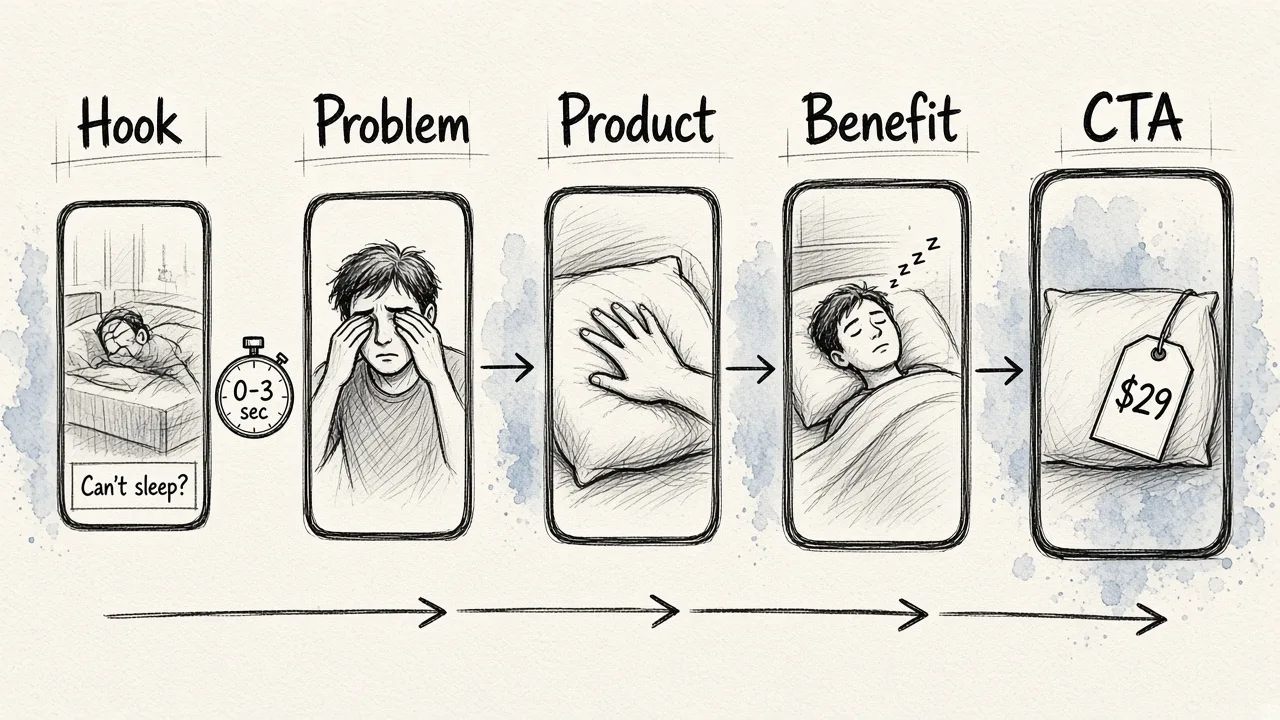
Most AI video ad generators can write a script for you, but you'll get better results if you either write it yourself or give the AI a clear structure to follow. For a 15 to 30 second ad, this five-beat structure works for almost any product:
- Hook (first 1 to 3 seconds). Name the problem or show something unexpected. This is where most viewers decide to keep watching or scroll.
- Problem. One line that makes the viewer nod.
- Product as the answer. Show the product doing its job.
- Proof or benefit. A result, a feature that matters, or a quick customer-style reaction.
- Call to action. Tell them exactly what to do next, and repeat the offer.
A few copywriting rules make a big difference here:
- Lead with the benefit, not the product name. "Sleep better tonight" pulls harder than "memory foam pillow." People buy the outcome.
- One product, one message. Don't cram three features and two offers into 15 seconds.
- Write for sound-off viewing. Many people watch with the sound muted, so every key line should also work as an on-screen caption.
If you want to see how strong ads handle hooks and benefit-led lines, our breakdown of advertising copy examples and why they work is a good warm-up before you write.
Here's what the pillow script might look like:
Hook (on screen): "Still flipping your pillow at 3 a.m.?" Problem: "Your pillow traps heat. You wake up hot. Again." Product: Close-up of the pillow, hand pressing into the cool surface. Benefit: "Cooling foam that stays comfortable all night." CTA: "20% off this week. Shop now."
That's short enough for a 15-second vertical ad and clear enough that any AI tool can build scenes around it.
Step 3: Prepare your product visuals
You can generate a video ad from text alone, but ads built around your real product usually look more credible than ads built from generic AI imagery. If you have even one decent product photo, use it.
Before you feed that image into a video generator, clean it up:
- Remove the background. A product on a clean or simple background is easier for AI to animate and place into new scenes. It also looks sharper in a busy feed.
- Remove distractions. Price stickers, cables, clutter on the table, a stray hand at the edge of the frame. Object removal takes these out in seconds.
- Fix the lighting and color. A quick edit so the product looks the way it does in real life prevents complaints and returns later.
- Create a few variations. The same product on two or three different backgrounds gives you more scene options without reshooting.
This is where an all-in-one editor saves time. In EditorAI you can describe the change you want in plain text, like "remove the background and place the pillow on a soft gray bed sheet." Then you can move straight into generating video from that cleaned-up image instead of exporting and re-uploading between tools.
If you already have video footage, such as a quick phone clip of the product in use, you can swap or clean up the background in that too. Our test of free AI video background changer tools covers which options hold up without a green screen.
Step 4: Generate the video from your text
Now you're ready to generate. The exact buttons differ by tool, but the workflow looks roughly the same across the free AI ad video generators that rank for this topic:
- Choose your starting point. Most tools let you start from a text prompt, a product image, a script, or a product page link. If you prepared a product image in Step 3, start from the image plus text. If not, start from the script.
- Pick an ad format. Common formats include UGC (creator-style), product demo, talking head, customer review, pain point and solution, unboxing, and polished brand or "TV commercial" style. Match the format to your tone from the brief.
- Set the aspect ratio and length. Choose vertical for Reels, TikTok, and Stories. Choose square or landscape for feeds and YouTube. Keep the first version short, around 15 seconds.
- Add voice and captions if needed. Some tools generate voiceovers and offer avatars. If your ad is sound-off friendly, captions matter more than the voice.
- Generate one version first. Don't burn all your free credits on ten variations before you've seen whether the first one works.
When you write the generation prompt, describe scenes the way a director would. Specify the shot, the motion, the mood, and the text on screen. For example:
"Vertical 9:16 video, 15 seconds. Open on a dim bedroom, a person turning over restlessly. On-screen text: 'Still flipping your pillow at 3 a.m.?' Cut to a slow close-up of the pillow on a gray sheet, a hand pressing into it. Soft morning light. Caption: 'Cooling foam that stays comfortable all night.' End on the pillow with '20% off this week. Shop now.'"
Specific prompts like that give you fewer surprises and fewer wasted generations.
Step 5: Edit the hook, captions, and pacing
Your first generation is a draft, not a finished ad. Spend a few minutes on these edits before exporting:
- Tighten the opening. The first three seconds decide whether the ad gets watched. Try two or three different openings: a bold text-on-screen line, a surprising visual, or a direct question. Some tools are built specifically to let you recut the first few seconds many ways without rebuilding the rest of the video.
- Check every caption. AI-generated text in video can come out misspelled or oddly placed. Read every word on screen.
- Trim dead air. If a shot lingers longer than it needs to, cut it. Short ads feel faster and hold attention better.
- Make the product visible early. Viewers should see what you're selling well before the end.
- End on a clear CTA frame. Hold the final offer and call to action on screen long enough to read.
If the AI-written copy feels flat, rewrite it yourself. A human pass on the hook and CTA is often the single biggest improvement you can make. For more on pairing copy with your visuals, see our guide to an AI ad copy generator that works with your image design.
Step 6: Make variations for testing
Once one version works, variations are where AI pays for itself. Brands running ads across Meta, Google, TikTok, and LinkedIn often need dozens of creative variants per campaign. A single product launch can call for 30 or more unique creatives. Doing that by hand is slow. With AI, it's mostly a matter of changing one thing at a time.
Good variables to test:
- Hook. Same video, three different opening lines.
- Format. UGC-style versus clean product demo.
- Offer framing. "20% off" versus "Save $10" versus "This week only."
- Visual setting. The product on different backgrounds or in different scenes.
- CTA. "Shop now" versus "Try it tonight."
Change one variable per version so you can tell what actually moved results. Free tiers rarely let you generate dozens of versions, so pick your two or three strongest ideas and test those first.
Step 7: Export in the right size for each platform
Every platform has its own preferred dimensions, and using the wrong one gets your ad cropped or letterboxed. Here are the common sizes:
| Platform and placement | Dimensions | Shape |
|---|---|---|
| Instagram Post | 1080×1080 | Square |
| Instagram Story and Reels | 1080×1920 | Vertical |
| TikTok | 1080×1920 | Vertical |
| Facebook feed | 1200×628 | Landscape |
| LinkedIn sponsored content | 1200×627 | Landscape |
| 1000×1500 | Tall vertical | |
| YouTube | 1280×720 | Landscape |
If you only have the budget for one format on a free plan, go vertical (1080×1920). It covers Reels, Stories, and TikTok, which is where most short-form video ads run. Before uploading, check that no captions or logos sit too close to the edges, where platform buttons and usernames tend to cover them.
Free AI ad video generators compared
Here's how the main options stack up for someone who wants to make video ads from text without paying upfront. The ranking reflects how well each tool fits the full workflow in this guide: text in, clean product visuals, video out, ready to post.
| Tool | Starts from | Best for | Watch out for |
|---|---|---|---|
| EditorAI | Text descriptions and images | Doing the whole job in one editor: product cleanup with background and object removal, video generation, and ad creative | Less focused on large-scale ad account publishing than performance-ad platforms |
| HeyGen | Product photos, copy, or a script | Avatar-led and voiceover ads, with 175+ languages and many variations for A/B testing | Avatar-style ads aren't the right fit for every brand |
| Creatify | Product page links or scratch | UGC and cinematic ads at scale, with a free first ad and no credit card required | Paid plans start around $39 a month once you go past the free start |
| Dreamina | Text prompts and product images | Generating an ad visual, then animating it into a video | Better for concept and visual generation than detailed ad editing |
| Nextify | Product images, prompts, or reference clips | Choosing from many ad formats and generating up to 10 variations | Free usage limits apply to larger batches |
| InVideo | Text prompts, images, or a product link | Hook editing and localizing voiceover and captions into other languages | The agent-style editing has a learning curve |
| Zeely | Brand and product details | Fast avatar ads, built in about 7 minutes | Paid plans start at $12 |
| Canva | Templates | Template-based video ads if you already design in Canva | Free plan is limited; premium elements are paid |
| PixelPanda | Product photos | Free, no-watermark static ads across 8 platform sizes | Static images are free, but video ads are paid |
If you mainly want avatar-driven UGC ads, a dedicated avatar tool may suit you better. If you want to start from a plain text idea and your own product photo, then edit and generate without switching apps, an all-in-one editor is the more practical choice on a free budget.
Common mistakes that waste free credits
A few habits drain free tiers faster than anything else:
- Generating before writing a brief. Vague prompts mean more retries. Spend five minutes on the brief from Step 1.
- Asking for too much in one ad. Multiple products, features, and offers in 15 seconds confuse both the AI and the viewer.
- Skipping product cleanup. A cluttered source image produces a cluttered video. Remove the background and distractions first.
- Generating ten variations at once. Get one good version, then branch from it.
- Ignoring captions. Many viewers watch muted. If the message only lives in the voiceover, much of your audience misses it.
- Forgetting the platform. A landscape ad dropped into TikTok wastes most of the screen.
- Not proofreading. AI can misspell on-screen text or invent a feature your product doesn't have. Check every claim before you publish.
A quick checklist before you publish
Run through this list before your ad goes live:
- The hook lands in the first three seconds.
- The product appears early and looks accurate.
- Every caption is spelled correctly and readable on a phone.
- The offer and CTA are clear and match your landing page.
- The video is sized correctly for the placement.
- Nothing important sits under platform buttons or text overlays.
- Any claims in the ad are true and supportable.
- You have at least two variations ready to test.
Frequently asked questions
Can I really make a video ad for free with AI?
Yes. Many tools offer a free tier, free credits, or a free first ad. Expect limits on the number of generations, export quality, or watermarks. A clear brief and script help you get a usable ad within those limits.
Do I need to film anything?
No. You can generate a full video ad from text alone. That said, ads built around a real product photo usually look more trustworthy than fully AI-generated imagery, so one clean product shot is worth having.
How long should an AI video ad be?
For Reels, Stories, and TikTok, around 15 seconds is a good starting point. Short ads are cheaper to generate on a free plan and easier to keep tight. You can test longer cuts once you know which hook works.
Will AI write the script for me?
Most AI video ad generators can draft a script from your product details or a product link. You'll still get better results by giving the AI a structure (hook, problem, product, benefit, CTA) and rewriting the hook and CTA yourself.
What's the biggest factor in ad quality?
Your input. A specific brief, a structured script, and a clean product image matter more than which generator you use.
Wrapping up
Making video ads from text for free is realistic now, as long as you treat free credits as a budget rather than an unlimited resource. Write a tight brief, script the ad in five beats, clean up your product visuals, generate one version, edit the hook and captions, then build a few variations and export them in the right sizes.
If you want one place to handle the product image cleanup, the text-driven edits, and the video generation, EditorAI is the simplest way to go from an idea to a finished ad without bouncing between tools.