Automated product photography means producing consistent, catalog-ready product images with as little manual work per shot as possible. There are two ways to get there. Robotic studio systems automate the capture itself: turntables, lighting and camera triggers all run from one controller. AI editing tools automate everything after the shutter: cutouts, backgrounds, staging and resizing. For most online sellers and marketing teams, the better starting point is an AI editor like EditorAI. You describe the edit in plain text ("remove the background, place it on a marble counter with soft morning light"), and one photo becomes a full set of listing and ad images. You don't need to buy studio hardware first. Robotic studios still earn their cost at high volume, especially for 360 spins and 3D models. This guide covers both routes and shows how to combine them into one workflow.
What "automated" actually covers
When people search for this topic, they usually mean one of three things:
- Automated capture. Hardware such as turntables, synchronized strobes and motorized camera arms that shoots a product from set angles with a single trigger. Vendors like Orbitvu and PhotoRobot build entire studio machines around this idea.
- Automated post-production. Software that removes backgrounds, cleans up dust and reflections, crops to marketplace specs and exports in bulk.
- AI generation. Tools that take a plain product shot and create staged lifestyle scenes, new backgrounds and new lighting without a reshoot.
Most real workflows mix at least two of these. A brand might capture clean shots on a turntable, then use AI to stage those shots into lifestyle scenes for ads. A small shop might skip hardware entirely and use a phone with a cheap lightbox, then let AI do the heavy lifting.
Why businesses automate product photos
The reasoning is simple. Shoppers can't touch the product, so images do the job a store shelf used to do. PhotoRobot makes this point in its own material: rich, detailed imagery from many angles builds buyer confidence, lifts sales and reduces returns. Marketplaces reward that kind of content too.
Doing it by hand doesn't scale. Every new SKU means setting up lights, shooting, retouching, cropping for each channel, renaming files and uploading. Automation removes the repeated steps so people can spend their time on the creative decisions: lighting style, positioning and scene.
The best automated product photography options, ranked
This ranking is for a typical online seller or in-house marketing team with tens to a few thousand SKUs. If you shoot tens of thousands of items a month, item 2 probably belongs at the top of your list.
1. EditorAI (AI editing and generation from text)
EditorAI is an all-in-one AI editor for images, video and marketing content. For product photography, it covers background removal, object removal, AI product photography scenes and an ad creator. All of it runs from text descriptions, so you don't need a stack of separate apps.
Pros
- Works with photos you already have, including phone shots.
- Text-based edits make staging fast and repeatable: describe the scene once, then reuse the prompt across products.
- The same tool turns product images into ads, video and presentations, so assets don't scatter across subscriptions.
- No hardware cost and no studio space needed.
Cons
- It doesn't automate capture. You still need a reasonably sharp, well-lit source photo.
- It isn't built for 360 spin sets or photogrammetry 3D models.
- Very large catalogs that need DAM or PIM integrations may want a dedicated studio pipeline as well.
2. Robotic studio systems (Orbitvu, PhotoRobot)
These are the machines most of the top search results are about. PhotoRobot's ecosystem covers stills, 360 spins and photogrammetry 3D models. Category presets automate shutter triggers, strobes and turntable movement. Its software adds production tracking, scannable codes that start software sequences on the studio floor, and channel-ready exports at target pixel sizes with metadata kept intact. It also offers webhooks that connect to DAM, PIM and ERP systems. Orbitvu sells studio machines that automate both product and fashion photography.
Pros
- True capture automation with very consistent angles and lighting.
- Strong for 360 spins and 3D, which AI editors don't replace.
- Built for production-line studios, with operator training and status tracking.
Cons
- A large upfront investment plus floor space and trained operators.
- Lifestyle and ad creative still needs a separate step.
- Overkill for small catalogs. Photography forums regularly debate whether these machines pay off below serious volume.
3. Dedicated AI product photo generators (Pebblely, insMind, Photoroom)
A recent third-party roundup of AI product photography generators placed Pebblely first (9.1/10), then insMind (8.9) and Photoroom (8.6). Their main strengths are batch runs driven by reference images, consistent staging across SKUs, and transparent PNG cutouts for marketplaces.
Pros
- Focused on product staging and cutouts, with batch-friendly workflows.
- Good consistency across a catalog when you work from a reference image.
Cons
- Mostly single-purpose. You'll likely need other tools for video, ads and broader edits.
- Less flexible when you want freeform edits beyond backgrounds and scenes.
4. General design and generative tools (Pixelcut, Canva, PromeAI, Adobe Firefly)
The same roundup ranked Pixelcut (8.5), Canva (8.2) and PromeAI (7.7) in the middle, with Caspa, Vmake.ai, Blend and Adobe Firefly lower for this specific use case. Adobe Firefly was the only one tagged as enterprise-focused.
Pros
- Familiar interfaces, and often already part of a team's toolkit.
- Good for layouts, social graphics and quick one-offs.
Cons
- Product staging is one feature among many, so catalog consistency takes more manual effort.
- These tools are not built around SKU-level batch work.
5. Outsourced 360 and automated photography services
Some studios sell automated product photography as a service. You ship them products, and they return spin sets and stills shot on their own rigs.
Pros
- You get studio-grade capture without buying the hardware.
- Useful for one-off catalog launches.
Cons
- Shipping, turnaround time and per-item costs add up for ongoing work.
- You still need an editing step for campaign and lifestyle creative.
Quick comparison
| Option | Automates capture | Automates editing/staging | 360 / 3D | Ads and video from same tool | Best fit |
|---|---|---|---|---|---|
| EditorAI | No | Yes, via text prompts | No | Yes | Small to mid catalogs, marketing teams |
| Robotic studios (Orbitvu, PhotoRobot) | Yes | Partly (export, presets) | Yes | No | High-volume studios |
| AI product generators (Pebblely, insMind, Photoroom) | No | Yes | No | Limited | Catalog staging and cutouts |
| Design tools (Canva, Pixelcut, Firefly) | No | Partly | No | Partly | Mixed design work |
| Outsourced services | Yes (theirs) | Partly | Yes | No | One-off launches |
Building an automated product photography workflow
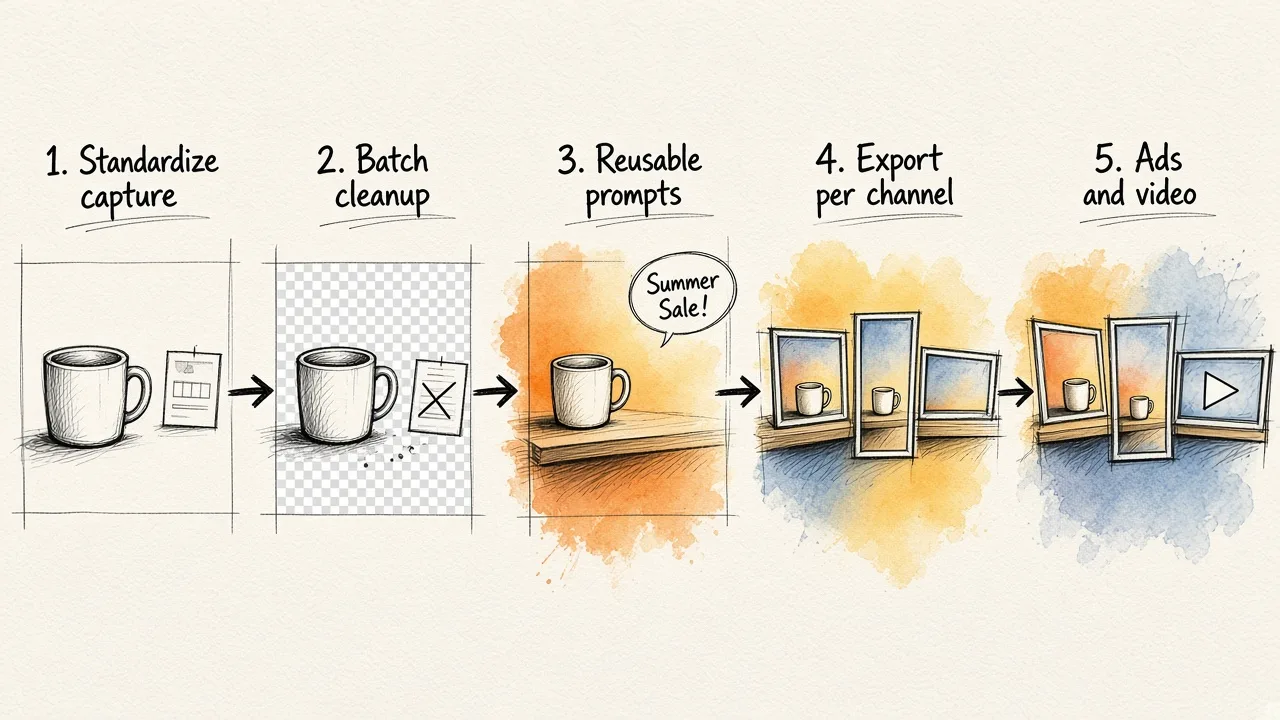
Whichever tools you choose, the workflow tends to look the same. Automate each stage you repeat more than a few times.
1. Standardize capture. Even without a robot, fix your setup: same background, same light positions, same camera height and distances for each product category. Write it down as a preset. This is the cheap version of what studio machines do in hardware, and it makes every later AI step more reliable.
2. Batch the cleanup. Run background removal and object removal (stray tags, dust, reflections, props) across the whole shoot rather than image by image. Clean cutouts are the base for everything that follows.
3. Stage with reusable prompts. Write a short scene description for each product line, for example "white oak shelf, soft window light from the left, shallow depth of field". Reuse it so your catalog looks like one brand, not a hundred experiments.
4. Export for each channel. Marketplaces, your site, and each social platform want different sizes and aspect ratios. Set up export targets once, then export everything to them.
5. Turn photos into campaigns. This is where many teams stop too early. The same staged images can feed your ads directly. If you're choosing a tool for that step, our comparison of the best free AI ad generators lays out the trade-offs. Still images can also become short clips. This guide on making AI video ads from text walks through it.
6. Pair images with copy that sells. A great product shot under weak copy still underperforms. When you write the text that goes with your visuals, these ad copy examples that converted show what tends to work and why.
How to choose
Ask these questions in order:
- Do you need 360 spins or 3D models? If yes and at volume, look at robotic studios or an outsourced service for capture.
- Is your bottleneck shooting or editing? Most small and mid-size sellers find editing, staging and resizing eat far more hours than the shoot itself. AI editing solves that first.
- How many tools do you want to manage? One editor that handles photos, ads and video is easier to run than separate apps for cutouts, scenes and campaigns.
- Does it need to connect to your systems? Enterprise catalogs with DAM, PIM or ERP integrations should check webhook and export support early.
Common mistakes to avoid
- Automating inconsistency. If source photos vary wildly, automation scales the mess. Standardize capture first.
- Over-staging. Lifestyle scenes that misrepresent size, color or material drive returns, which defeats the purpose. Keep at least one clean, accurate shot per product.
- Ignoring channel specs. Wrong aspect ratios get cropped badly or rejected. Build exports around each channel's requirements.
- Stopping at the listing. Your product images are also your ad creative. Plan for reuse from day one.
The bottom line
Automated product photography isn't one machine or one app. It's a pipeline. Robotic studios automate capture and make sense for high-volume, 360 and 3D work. For everyone else, the biggest time savings come after the shutter: cleanup, staging, resizing and turning images into campaigns. Start with a standardized capture setup and an AI editor like EditorAI to handle the rest. Add studio hardware only when your volume clearly justifies it.