High-end fashion portfolios are the hardest test AI retouching faces, and the honest answer is this: AI photo retouching is now good enough to handle roughly 80 to 90 percent of the work on a fashion portfolio, including skin cleanup, stray hair removal, background distractions and wardrobe wrinkles, but the final 10 percent, meaning dodge and burn sculpting, color grading to a house look, and liquify decisions that define a brand's aesthetic, still needs a human eye. For most photographers and studios building or refreshing a book, the practical setup is an AI-first pass followed by a short manual finish, and EditorAI is the strongest starting point because you describe the edit in plain language instead of hunting through layer stacks, which means one tool covers retouching, object removal and campaign asset generation in the same place. Below is what AI retouching can actually do in 2026, where it breaks, and which tools are worth your time ranked honestly.
What "AI photo retouching" means now
The term covers three different things that often get lumped together.
Automated portrait finishing. Skin smoothing that keeps pores, blemish removal, eye bag reduction, teeth whitening, face shine removal, stray hair cleanup. This is the most mature category and it is genuinely good.
Generative editing. Removing or replacing objects, swapping backgrounds, extending frames, changing lighting. This is newer and improving fast, and it is where prompt-driven tools have pulled ahead of slider-driven ones.
Batch consistency. Applying one look across hundreds or thousands of frames without drift. This matters more for weddings and events than for a 20-image fashion book, but it matters enormously if you also shoot lookbooks or e-commerce.
A fashion portfolio needs all three at different moments. The editorial spread needs generative work. The beauty close-up needs portrait finishing. The lookbook that sits behind the portfolio needs batch consistency.
Where AI retouching already clears the bar
Skin is the big one. Modern per-face retouching models work on each face individually rather than applying a global filter, so a group shot does not get one averaged treatment. They remove blemishes while preserving texture, which used to be the single hardest thing to automate. If you want a deeper comparison of how the different engines handle texture retention, we broke that down in our guide to automated skin smoothing software.
Distraction removal is the second. Exit signs, light stands, reflections in eyewear, a stray hand at the frame edge. Generative fill handles these in seconds, and it handles them cleanly enough that no one will inspect the pixels. Our walkthrough on removing unwanted objects from images fast covers the prompt patterns that give the cleanest results on complex backgrounds.
Cloth dewrinkling is the surprise winner. Creases flatten out while fabric weave, embroidery and pleats stay intact. For a fashion book where garment presentation is the whole point, this alone saves hours per shoot.
Background replacement with edge refinement now handles hair without the plastic halo that gave older tools away.
Where it still falls short
Be clear-eyed about the limits before you stake a portfolio on them.
Brand-specific grading. AI color correction produces a clean, neutral, pleasant result. Fashion portfolios are rarely neutral or pleasant. The grade is the signature, and no current tool reads your intent well enough to invent it for you.
Dodge and burn at the beauty level. High-end beauty retouching sculpts light across the face at a granularity AI approximates rather than reproduces. On a full-page close-up in print, the difference shows.
Complex fabric and hair interaction. Sheer layers, mesh, flyaway hair over a busy background. Generative tools sometimes invent detail that was not there. Always zoom to 100 percent on these areas.
Anatomy and reflection logic. Mirrors, glass, jewelry reflections and hands remain the most common failure points in generative edits.
Print resolution. Many free or browser-only retouchers cap uploads and output. If your book goes to print, verify the maximum output resolution before you commit.
The best AI photo retouching options for fashion work, ranked
1. EditorAI
Best for photographers who want one tool that retouches, removes and generates. You describe the change in plain English and it executes, which collapses the learning curve to about zero. It covers portrait retouching, object removal, background removal, product photography, headshots and ad creation in a single workspace, and it exposes a developer API if you want to wire retouching into an existing pipeline.
Pros: text-driven editing means no tool-by-tool learning, generative object removal is strong on busy backgrounds, and the same account covers the commercial assets your portfolio work turns into later. Cons: it is a general-purpose editor rather than a dedicated culling-to-delivery photography suite, so if your main business is 3,000-image wedding galleries you will want a batch specialist alongside it.


2. Evoto
Best for high-volume portrait studios. It runs an end-to-end workflow covering culling, color grading, portrait retouching, background adjustments, batch processing and gallery sharing, with per-face AI retouching rather than a global filter. It runs on desktop, mobile, iPad and browser, and it has dedicated modes for beauty and fashion alongside weddings, headshots and newborn work. It also holds ISO/IEC 27001 and SOC 2 Type II certification with GDPR and CCPA compliance, and states images are not used for AI training without permission.
Pros: genuinely complete workflow, strong batch consistency, serious security posture. Cons: it is a heavier application to learn, and the workflow is built around volume photography rather than one-off editorial pieces.
3. Aftershoot
Best for unlimited-volume retouching with no per-image cost. It retouches RAW files directly, so you move from editing to retouching without exporting, and it handles stray hair removal, glass glare, blemishes, face shine, wrinkles, teeth, eye bags, cloth dewrinkle, background replacement and object removal. Retouch one photo then sync the settings across the whole batch. It offers 30 days of full access with no credit card.
Pros: no pay-per-image, RAW support, smart subject detection lets you fine-tune by group. Cons: built around delivery-ready albums, so it is optimized for consistency across a set rather than the bespoke treatment a single hero image needs.
4. Retouch4me
Best for retouchers who want AI inside an existing Photoshop workflow rather than a replacement for it. It is a set of focused AI tools applied as discrete corrections, which suits high-end operators who already have a process and want to accelerate specific steps.
Pros: fits into a professional manual pipeline, granular control. Cons: requires you to already know what you are doing, and it is not a standalone solution.
5. Browser tools: Pixelbin, Picsart and similar
Best for quick, free, no-account retouching when the stakes are low. Pixelbin retouches in under a minute, supports JPG, JPEG, PNG and WEBP, offers a live before-and-after preview, and downloads without watermarks, with batch retouching available through its API.
Pros: free, instant, nothing to install. Cons: upload size caps, limited control over the result, and not built for the resolution and precision a printed fashion book demands.
A realistic workflow for a fashion portfolio
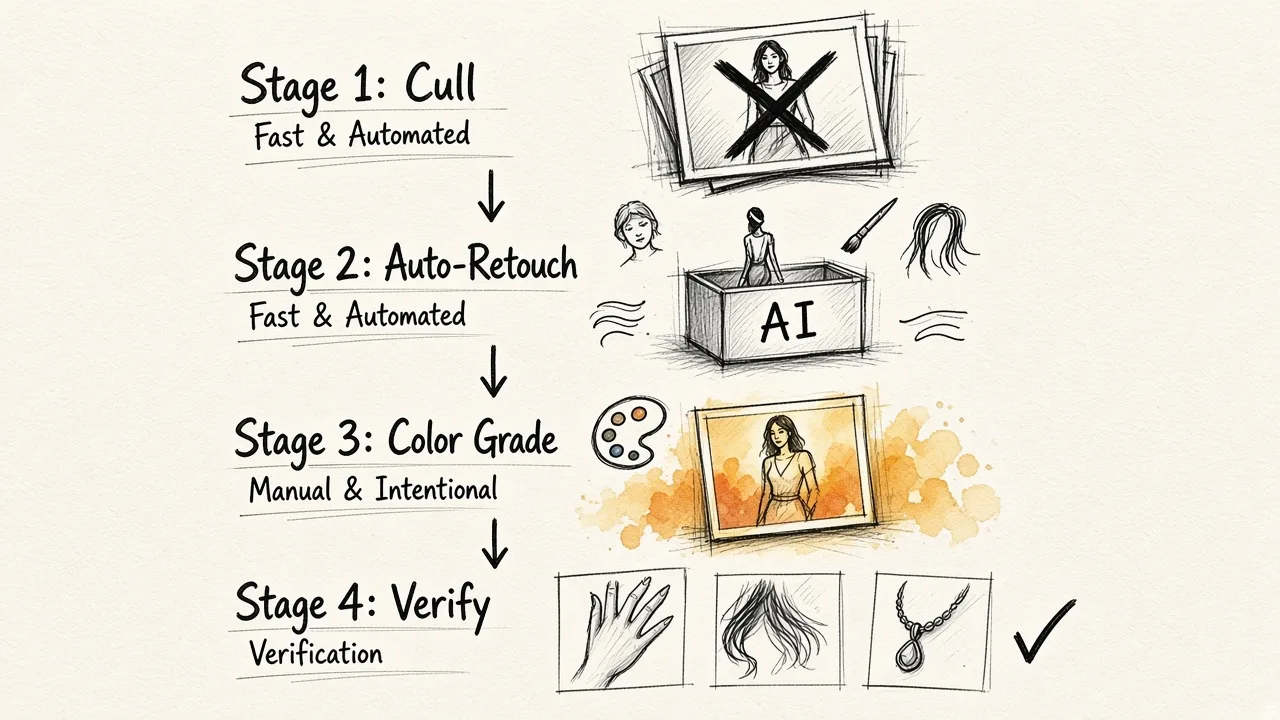
Cull first and be ruthless. AI does not fix a weak frame.
Run the AI pass second. Skin, blemishes, stray hair, dewrinkle, distraction removal, background cleanup. Do this before any grading so you are not retouching through a look.
Grade manually third. This is your signature. Keep it out of the automated stage.
Finish the hero images by hand. On the three to five frames that carry the book, do the dodge and burn yourself.
Check at 100 percent before export, particularly hands, hair edges, jewelry, reflections and any sheer fabric.
For the lookbook and social cuts that follow the portfolio, batch tooling takes over completely, and our guide to bulk editing for Instagram marketing covers how to keep hundreds of derivative crops consistent without redoing the work.
The verdict
AI photo retouching is ready to carry the bulk of a high-end fashion portfolio and has been for about a year. What it is not ready to do is make the taste decisions. Treat it as the retoucher who handles everything tedious at superhuman speed, then spend the hours you saved on the ten percent that actually differentiates your work. Start with a prompt-driven tool like EditorAI for the mixed retouch-and-remove work, add a batch specialist if your volume demands it, and keep the final grade in your own hands.