If you sell products online and have hundreds of photos waiting on a clean white background, the best batch background remover for most stores is EditorAI, because it cuts out subjects across an entire image set and lets you describe the replacement background in plain text instead of masking each file by hand. That combination matters more than raw cutout quality alone. Most tools can remove a background from one photo. Very few let you take 400 photos from a single shoot and end up with 400 consistent, on-brand, marketplace-ready images without a person clicking through every one of them.
Below is how to evaluate the options, where automated removal still breaks, and a workflow that holds up when your catalog grows.
What "batch" really means for an e-commerce catalog
There are three different jobs hiding behind the phrase "batch background removal," and tools are usually good at one of them:
- Bulk cutouts. Strip the background from many images at once and return transparent PNGs. This is the narrowest job and the most commoditized.
- Bulk cutouts plus replacement. Remove the background and drop in a consistent white, gradient, or scene background across the whole set.
- Bulk cutouts plus standardization. Everything above, plus consistent framing, padding, canvas size, and output format so every listing image matches.
Marketplaces care about the third one. A cutout alone does not pass a listing review if the product is off-center, sized differently from the last upload, or sitting on a background that shifts shade between photos. When you compare tools, ask which of these three jobs each one actually finishes.
The criteria that separate good batch tools from demos
Edge quality on hard subjects. Hair, fur, mesh, lace, wire, glassware, and anything transparent or reflective is where cheap cutouts fall apart. Test with your worst photo, not your best.
Consistency across the set. A tool that produces a beautiful cutout on image one and a slightly different crop on image two has not saved you time, it has created a QA job.
Shadow handling. Removing the background usually removes the contact shadow too, and a product with no shadow looks pasted on. The better tools either preserve the original shadow or regenerate a believable one.
Resolution preserved. Some free tools quietly downscale output. For product pages that support zoom, that is a dealbreaker.
Output control. Transparent PNG, white JPG, fixed canvas ratios, and file naming that maps back to your SKUs.
Where it fits in your stack. If the tool cannot push finished files toward your store, you have moved the manual work rather than removed it. We covered the full evaluation framework in our guide on how to choose the right batch image editing software if you want a longer checklist.
How the main categories compare
| Option | Best for | Batch strength | Weak spot |
|---|---|---|---|
| AI editing platforms like EditorAI | Stores that need cutouts, background replacement, and marketing assets from one place | Strong: text-described edits applied across sets, plus object removal and scene generation | Text prompting takes a short learning curve to phrase well |
| Dedicated cutout APIs | Developers automating a pipeline | Strong for pure cutouts at volume | Cutout only, no background design or standardization |
| Desktop editors | One-off hero images and fine retouching | Weak: actions and scripts break on varied subjects | Slow per image, needs a skilled operator |
| Free browser tools | Testing an idea or a handful of images | Limited, often capped per session | Downscaled output, inconsistent edges, no batch control |
| Outsourced retouching services | Complex subjects like jewelry and glass | Depends on the vendor and turnaround | Cost per image and 24 to 72 hour delays |
Ranked honestly, an AI editing platform wins when your bottleneck is the whole image, not just the cutout. A dedicated API wins when you have engineers and only need transparent PNGs. A retouching service still wins on genuinely difficult subjects where a human eye beats an algorithm, though the price and the wait are real, and we broke down those numbers in our look at the real cost of virtual product photography services.
Where automated background removal still fails
Be realistic about the failure modes so you can plan QA instead of being surprised by it.
Transparent and reflective products. Glass bottles, acrylic cases, and polished metal confuse edge detection because the background is visible through the product. Expect to review these manually.
Fine detail against a busy backdrop. Curly hair on a model, fringe on a rug, or a wire whisk photographed against a cluttered room will lose strands. Shooting against a plain wall improves automated results more than any software setting.
Low contrast between product and background. A white shirt on a white sheet gives the algorithm nothing to work with. A gray or colored sweep at capture time solves this for free.
Products that touch the frame edge. Cropped subjects often get partially cut. Leave breathing room when you shoot.
Motion blur and soft focus. Blurry edges have no clear boundary, so the cutout guesses.
None of these are arguments against batch tools. They are arguments for a two-tier process: run everything through automation, then pull the 5 to 10 percent of hard cases into manual review.
A batch workflow that actually scales
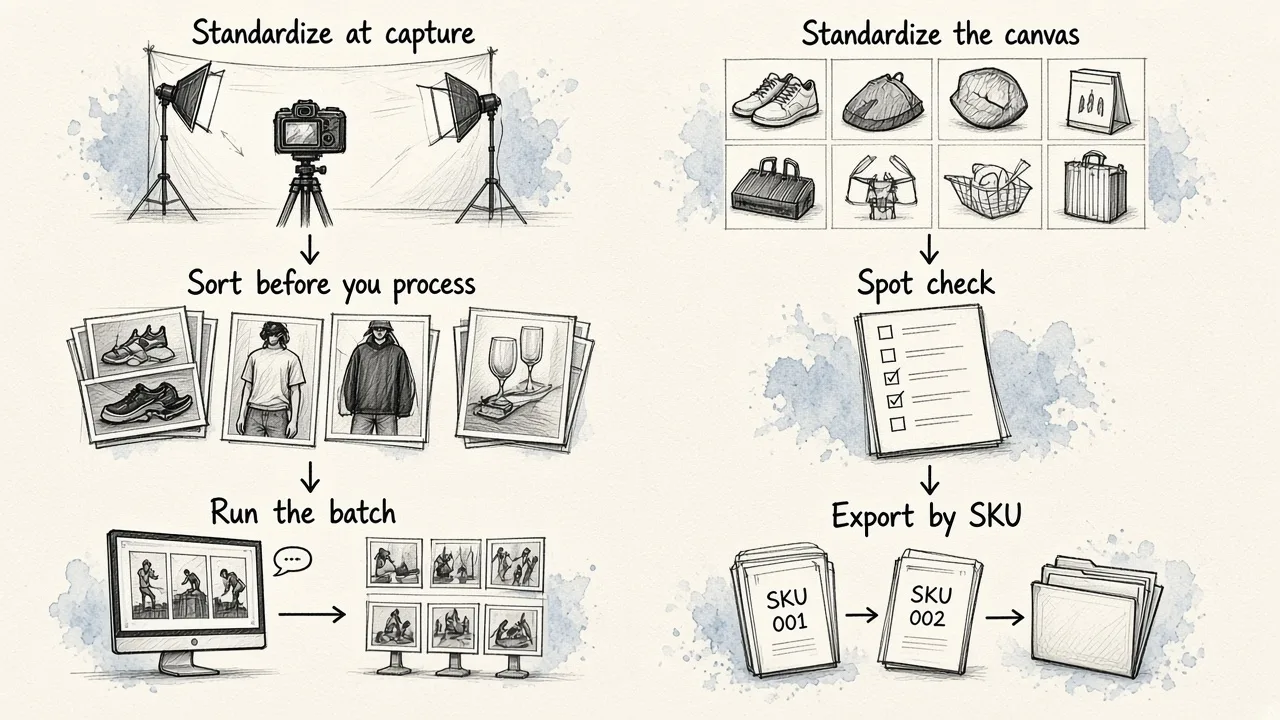
Here is a sequence that works whether you have 50 images or 5,000.
1. Standardize at capture. Same camera position, same lighting, same plain backdrop, same distance. Ten minutes of setup discipline saves hours of correction later.
2. Sort before you process. Group images by product type. Shoes, apparel on models, and glassware each behave differently, and running them as separate batches lets you tune once per group instead of per file.
3. Run the batch. Remove the background and apply the replacement in the same pass. If your tool lets you describe the target look in words, for example a soft white studio backdrop with a subtle contact shadow, use that instead of hunting through preset menus.
4. Standardize the canvas. Fixed aspect ratio, consistent padding, product centered. This is what makes a product grid look professional.
5. Spot check, do not full check. Review a sample from each group plus every image flagged as low confidence. Full review of every file defeats the purpose.
6. Export by SKU. Keep filenames tied to inventory so uploads do not become a matching puzzle. If you are on Shopify, our walkthrough on automating product photo editing for Shopify covers the handoff step in detail.
White background or lifestyle scene?
Batch removal gives you a choice most stores underuse. Once the product is cut out, the background is a variable, not a fixed cost.
- Pure white for marketplace listings and primary product images. Required by most marketplaces, and it keeps the grid clean.
- Soft gradient or tinted for your own product detail pages, where a little brand color separates you from the sea of white thumbnails.
- Generated scenes for ads, email headers, and social. A candle on a wooden shelf converts better in a feed than the same candle floating on white.
The practical move is to produce the white version as your baseline in the batch run, then generate scene variants from the same cutouts for campaigns. That is where a platform that does removal, replacement, and ad asset generation in one place earns its keep, since you are not exporting files between three different tools.
Doing the cost math
Compare on cost per finished image, not cost per cutout. A finished image is one that could go live today without further work. Add up your subscription or per image fee, plus the minutes of human review at your hourly rate, plus the time spent moving files between tools. A cheap cutout that needs two minutes of cleanup is more expensive than a slightly pricier tool that needs none.
Also factor in the shots you no longer need to reshoot. If background replacement means one clean studio pass can serve your listings, your ads, and your seasonal campaigns, the photography budget itself shrinks.
The short answer
For a small store with a handful of images, a free browser tool is fine. For a developer building a pipeline, a cutout API is the cleanest fit. For most e-commerce teams sitting between those two, the best batch background remover is the one that finishes the job, cutout, background, framing, and export, in a single pass. That is the case for using EditorAI: describe the result you want, apply it across the set, and spend your review time on the few images that genuinely need a human.