The best automated product photography tools combine artificial intelligence background replacement, smart lighting synthesis, and automated batch retouching to turn simple raw product shots into commercial-grade e-commerce assets. Instead of booking expensive physical studio days and waiting weeks for manual edits, modern merchants use automated software suites to isolate items, cast natural shadows, generate contextual lifestyle scenes through text descriptions, and format images for every marketplace in minutes. By eliminating technical friction, these automated solutions allow digital brands to publish complete, conversion-focused product catalogs at a fraction of traditional production timelines.
High-converting e-commerce stores rely on consistent, crisp imagery to build consumer trust. However, capturing dozens or hundreds of SKUs with traditional photography setups creates severe operational bottlenecks. Understanding the categories of automation available, along with how to integrate them into your listing pipeline, is the fastest way to scale your visual catalog without sacrificing visual quality.
The Bottlenecks of Traditional Studio Photography
Every online merchant eventually hits the physical limits of traditional studio shoots. Arranging a physical shoot requires renting studio space, shipping physical product samples, hiring photographers, styling scenes with props, and waiting days or weeks for manual post-production. If an item arrives scratched, or if you launch a new color variant three months later, you often have to repeat the entire logistical cycle.
Beyond scheduling delays, the financial overhead mounts quickly. Studio rentals, equipment depreciation, and hourly retoucher fees eat into margins. As explored in our breakdown on understanding the cost of virtual photography, shifting toward automated and virtual workflows dramatically lowers per-image production expenses while accelerating time-to-market. When automated tools handle repetitive tasks like background removal, lighting adjustments, and scene composition, your creative team can focus on marketing strategy rather than manual clipping paths.
Essential Categories of Automated Photography Tools
Automating product photography does not mean handing over creative control to a black box. Instead, modern e-commerce teams leverage modular tools designed for specific phases of image generation and optimization.
1. AI Background Isolation and Scene Generation
The foundation of automated commercial photography is clean segmentation. Automated isolation algorithms separate the product from its original background with sub-pixel accuracy, preserving complex edges like transparent glassware, fine fabric threads, and metallic reflections.
Once an item is isolated, scene generation tools place the product into digital environments generated from reference templates or written text descriptions. Instead of building physical kitchen sets, bathroom vanities, or outdoor patio scenes, merchants can describe the exact surface material, ambient lighting, and surrounding props they want. The software synthesizes a photorealistic background while grounding the product with physically accurate contact shadows and reflections.
2. Intelligent Object and Imperfection Removal
Raw product samples rarely look flawless right out of the packaging. Dust specks, manufacturing seams, shipping scuffs, and glare from studio strobes often show up on high-resolution camera sensors.
Automated object removal tools allow operators to brush over or automatically detect visual blemishes and eliminate them instantly. Rather than using manual clone stamps, intelligent inpainting algorithms sample the surrounding texture and lighting to patch flaws seamlessly. This keeps product surfaces looking pristine without softening key manufacturing details.
3. Automated Batch Retouching and Color Correction
Consistency across a collection makes an e-commerce storefront look established and trustworthy. Automated batch retouching tools apply standardized exposure curves, white balance adjustments, and color fidelity corrections across hundreds of uploads simultaneously.
If you shoot an apparel line across three separate days under varying natural light, automated color-matching software aligns all captures to match the exact fabric color code. This prevents customer returns driven by discrepancies between online photos and physical items.
4. Creative Ad and Asset Generation
A single product shot must perform across multiple formats: square formats for marketplace grids, vertical ratios for social stories, and wide banners for promotional newsletters. Automated platforms take the primary staged photo and generate complete marketing variants with complimentary typography, borders, and background extensions. At EditorAI, we built our platform to bridge this exact gap, enabling users to transform basic product photographs into finished ad creatives and promotional assets using simple text descriptions.
Key Features to Evaluate in Automated Tools
Selecting software for your store requires balancing raw speed against realism. Lower-tier tools often leave telltale digital artifacts that lower customer trust. Look for platforms that excel across these core capabilities:
Natural Contact Shadows and Reflections
The easiest way to spot poor automation is a product that appears to float above its background. Top-tier automated tools analyze the shape and weight of the item to project realistic directional shadows and surface reflections. A glass perfume bottle placed on marble, for example, must reflect both the stone surface and the ambient highlights of the generated room.
Edge Fidelity and Semitransparent Handling
Inspect how the tool handles difficult materials. Wire mesh, liquids, sheer fabrics, and complex hair or fur on lifestyle products test the limits of automated segmentation. The best automated product photography tools preserve soft gradients along edges rather than cutting items out with harsh, artificial borders.
Resolution and Print-Ready Output
E-commerce marketplaces require high-resolution zoom capabilities so shoppers can inspect textures and stitching. Ensure the tool you select outputs at minimum 2000 by 2000 pixels at high DPI without introducing digital noise, blur, or compression artifacts.
Prompt Sensitivity and Creative Direction
When using text-guided staging, the platform must respect subtle design nuances. You should be able to specify subtle camera angles, depth of field, and seasonal mood without the AI altering the physical dimensions or labels of your product.
How to Build an Automated Photography Pipeline
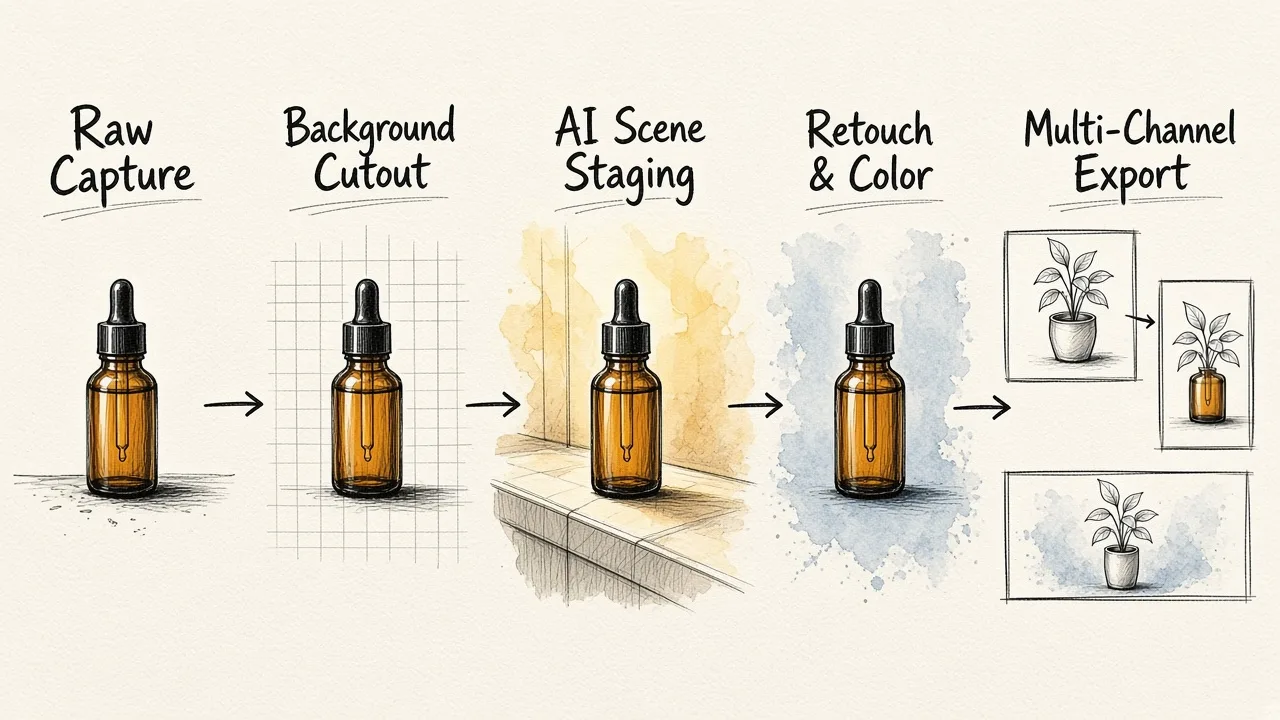
Implementing automated tools does not require replacing your entire content team. It simply reorganizes the production workflow to eliminate repetitive manual labor.
[Standardized Raw Capture]
         │
         ▼
[Automated Background Cutout]
         │
         ▼
[Text-Prompt Staging & Lighting]
         │
         ▼
[Blemish Cleanup & Color Match]
         │
         ▼
[Multi-Channel Marketplace Export]
Step 1: Capture Consistent Raw Plates
You do not need a commercial camera rig to feed automated engines. A smartphone mounted on a basic tripod in a evenly lit room is sufficient. Place your item on a plain white or neutral surface, ensure the camera is perpendicular to avoid perspective distortion, and take clear captures from your primary sales angles (front, 45-degree angle, top-down, and close-up detail).
Step 2: Extract and Clean the Subject
Import the raw image files into your automated tool. The platform strips away the plain background instantly. Run a quick check for stray dust or glare spots, using automated spot-removal brushes to clean up any physical flaws on the product casing or label.
Step 3: Direct the Environment
Choose whether your listing needs clean, marketplace-compliant white backgrounds or editorial lifestyle scenes. For lifestyle imagery, input structured prompts specifying the setting. For instance: "Resting on an oak tabletop, warm morning window light from the left, soft bokeh background featuring a modern minimalist kitchen." The software generates the environment around the product while matching the directional lighting of your initial capture.
Step 4: Validate Color and Dimensions
Check the generated output against your physical sample. Ensure brand logos, text markings, and core colors remain unaltered. Consistent presentation across personal and corporate platforms builds authority, a principle that applies whether you are optimizing product listings or learning how to look professional online in photos and video.
Step 5: Export for Multi-Channel Distribution
Export your finalized assets directly into your product information manager or e-commerce CMS. Use automated resizing profiles to generate matching thumbnails, square catalog assets, and promotional banners simultaneously.
Commercial Applications Across E-Commerce Categories
Different retail sectors benefit from automated photography in distinct ways:
- Beauty and Skincare: Brands can showcase bottles against clean marble, botanical garden settings, or water ripples without managing wet sets in a physical studio.
- Apparel and Accessories: Lay-flat items can be placed in aspirational lifestyle contexts, showing bags, jewelry, or sunglasses in chic urban environments or sunlit cafes.
- Packaged Consumer Goods: Food and beverage companies can quickly generate seasonal variants (such as holiday backgrounds, summer picnics, or autumn kitchens) around identical packaging without reshooting.
- Consumer Electronics: Matte surfaces and reflective screens receive uniform highlights and clean shadows, giving tech products a sleek, engineered aesthetic.
Maintaining Consistency Across Large Catalogs
The greatest challenge when using automated image generation is visual drift. If ten products in the same collection feature wildly different camera perspectives, lighting intensities, or shadow lengths, the collection page looks disjointed.
To keep your catalog uniform, establish clear aesthetic rules:
- Standardize Prompt Templates: Use a locked prompt structure where only the surface material or subtle accent colors change between SKUs.
- Harmonize Eye Levels: Keep your camera angle input consistent across all related items (for example, keeping a 15-degree downward tilt on all bottle products).
- Preserve Lighting Direction: If your primary catalog uses soft light coming from the top left, enforce that rule across all lifestyle scenes.
Just as organizations build standard visual identities for their workforce, as seen in our guides on the best automated corporate headshots for your team and how to create a business profile picture with AI, your product visual assets need structured guardrails. The technology provides the speed, but your stylistic guidelines protect the brand identity.
Evaluating ROI: Traditional Shoots vs. Automated Systems
Transitioning to automated software yields measurable returns across several commercial metrics:
| Metric | Traditional Studio Shoot | Automated Tool Workflow |
|---|---|---|
| Turnaround Time | 2 to 4 weeks | Minutes to hours |
| Cost Per Image | High physical overhead | Low software subscription |
| Reshoot Flexibility | Requires rebooking space | Instant text prompt revision |
| Format Adaptation | Manual cropping and retouching | One-click automated export |
| Catalog Scalability | Linear cost growth per SKU | Near-zero marginal cost per SKU |
By cutting asset production cycles from weeks to minutes, merchants can test new product concepts before committing to massive inventory orders. You can gauge audience interest with photo-accurate prototypes on social channels, refine marketing angles on the fly, and update seasonal creative across your entire site in an afternoon.
Scaling Your Visual Strategy
Automated product photography tools have moved from experimental novelties to indispensable components of modern digital commerce. They solve the fundamental conflict between high visual standards and rapid production schedules.
By selecting tools that prioritize realistic shadow physics, clean edge extraction, and flexible prompt control, your team can build an agile image engine that scales alongside your catalog. You can see how we approach image fidelity and generation across both commercial products and portraiture in our walk-through on how to get professional portraits from photos.
Equipping your business with EditorAI and disciplined automated workflows ensures your products always stand out on crowded search result pages, converting casual browsers into loyal customers.